구글 워크스페이스를 통해 구리 CRM 연락처 동기화 및 CRM 라이선스 비용 절감

Copper CRM은 고객 관계 관리를 위한 훌륭하고 기능이 뛰어난 소프트웨어입니다. 하지만 많은 조직에서는 Copper와 같은 CRM이 제공하는 광범위한 기능이 필요하지 않은 경우에는 적합하지 않을 수 있습니다. 주로 고객 연락처 관리를 위한 솔루션을 찾는 기업들은 과도한 기능에 부담을 느끼는 경우가 많습니다. 높은 라이선스 비용 각 팀원에게 별도의 라이선스가 필요한 CRM과 연결되어 있습니다.
Yet, there is a more affordable and suitable way for such companies to organize and manage their interactions with clients. SharedContacts.com offers a fantastic alternative to CRMs like Copper. It provides several key benefits, including affordability, as it does not require a separate license for every team member. This makes it accessible for businesses with tight budgets. The tool ensures streamlined collaboration among co-workers, allowing everyone to access, update, and share contact information easily. With Copper and Google Contacts integration, users can manage contacts directly on their mobile devices, enhancing usability and mobility. The interface is user-friendly and familiar, reducing the learning curve and enabling quick adoption by new users. By turning your CRM data into Google 공유 연락처, the app makes it simple for your whole team to collaborate easily inside your Google ecosystem.
SharedContacts.com is a cost-effective, collaborative, and convenient alternative for businesses focused on efficient contact management without the high costs and complexity of CRMs like Copper, and it takes mere minutes to install it and enjoy its functionality.
Copper와 Google 통합
Copper와 Google의 통합은 몇 단계만 거치면 간단합니다. 설정하려면 CRM 계정에 로그인하고 다음 지침을 따르세요:
- Copper 대시보드의 왼쪽 메뉴에서 다음을 클릭합니다. 설정.
- 화면 상단에서 Google 설정을 찾아 클릭한 다음, 다음을 선택합니다. Google 동기화 설정.
- 레이블이 지정된 상자를 선택합니다. Google 연락처 단방향 동기화.
이 단계를 완료하면 Copper가 Google 주소록에 전용 폴더를 생성합니다. CRM에 입력된 모든 새 데이터는 자동으로 Google 계정과 동기화됩니다.
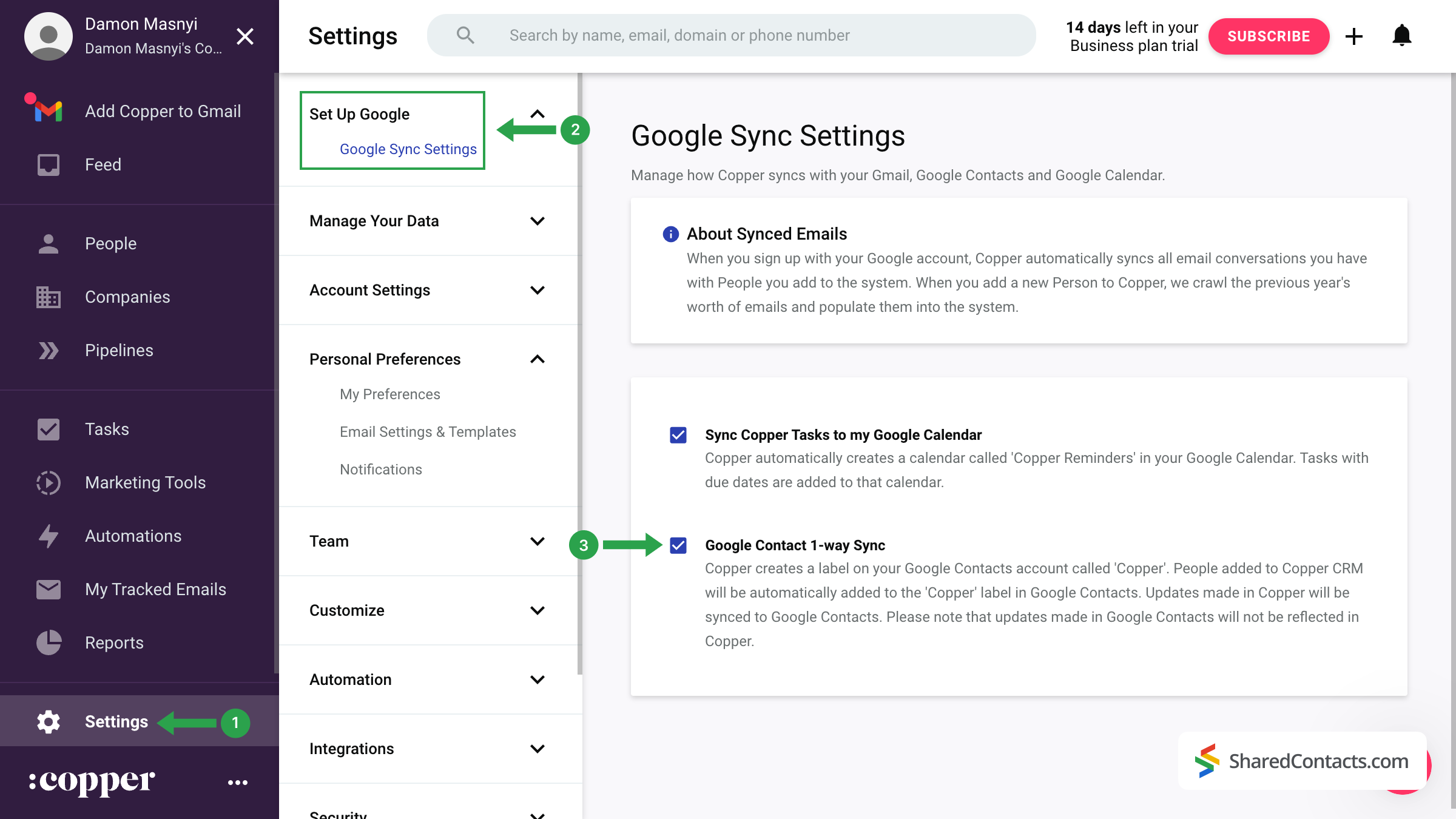
중요 참고 사항: 초기 동기화는 즉시 이루어지지 않습니다. Google 주소록에 '구리' 라벨이 바로 표시되지 않더라도 걱정하지 마세요. 전체 동기화에는 몇 시간에서 24시간 정도 걸릴 수 있습니다.
Share Copper Contacts With SharedContacts.com
Once your contacts have been successfully transferred from Copper CRM to Google Contacts, you can share them with colleagues and team members using the SharedContacts.com application.
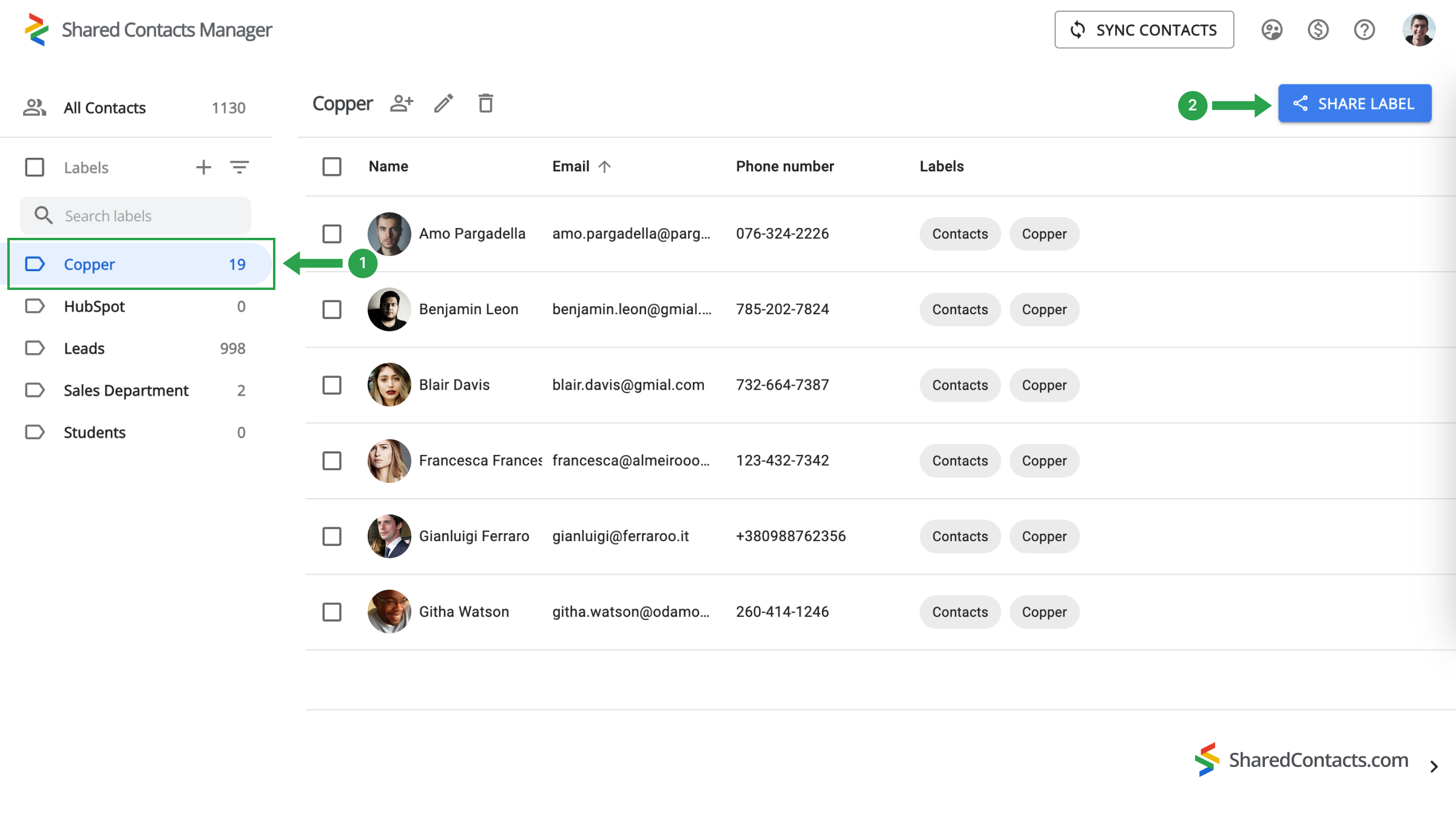
Access your SharedContacts.com account. If you don’t have the app installed, click 여기 를 클릭하여 쉽게 설치할 수 있습니다.
- 왼쪽 메뉴에서 동기화된 모든 연락처가 저장되어 있는 '구리' 라벨을 찾아 선택합니다.
- 를 클릭하고 레이블 공유 버튼을 클릭합니다.
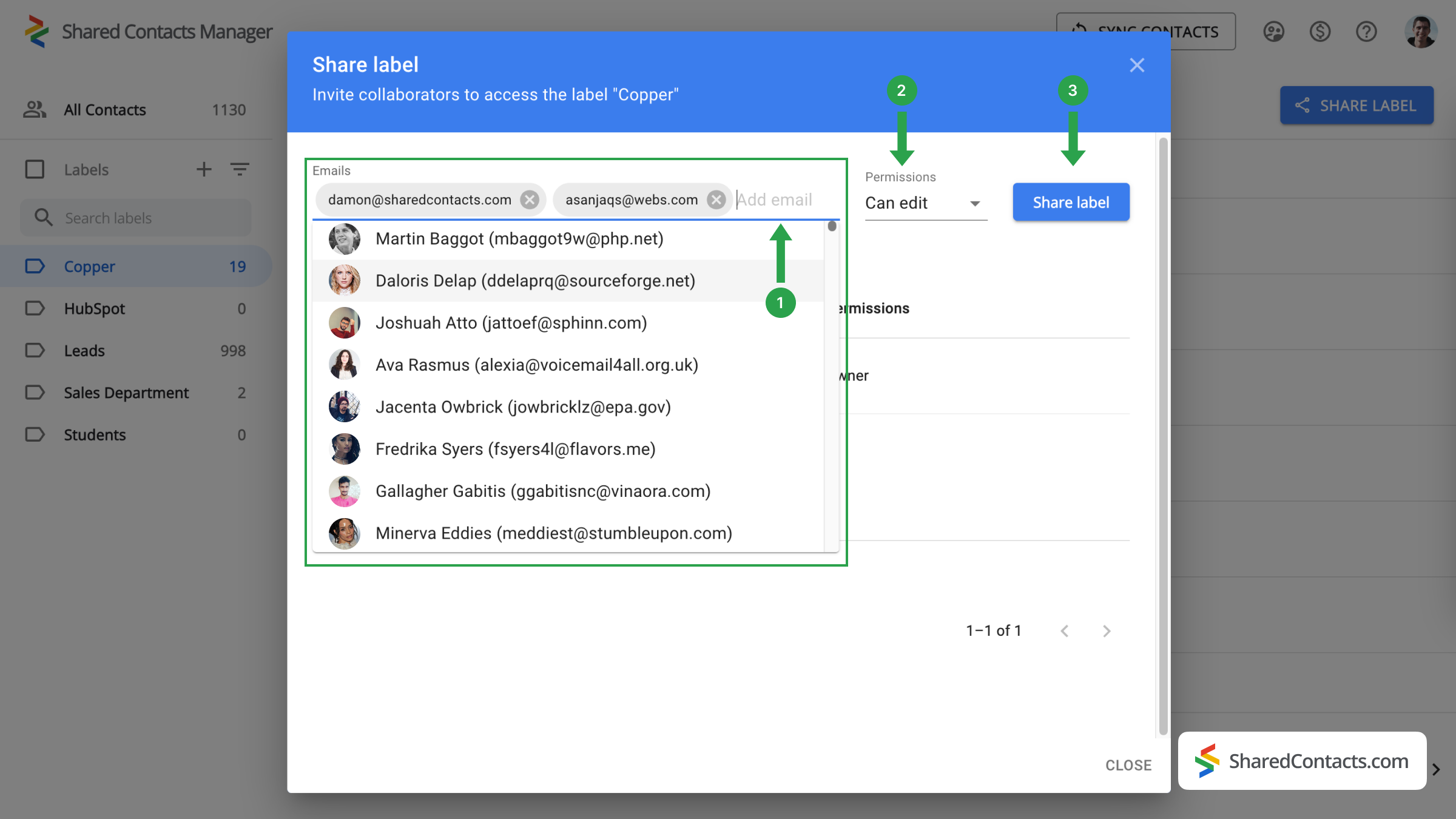
다음 창에서 액세스 권한을 부여할 사용자를 선택하고 권한을 지정하라는 메시지가 표시됩니다.
- 에서 이메일 필드에서 목록에서 공동 작업자를 선택하거나 이름을 입력하거나 이메일 주소를 입력하여 공동 작업자를 추가합니다.
- 사용 가능한 옵션에서 각 팀원에게 적합한 권한 수준을 선택합니다.
- 클릭 레이블 공유 를 클릭하여 프로세스를 완료합니다.
이제 Copper 연락처에 액세스 권한을 부여한 모든 사람이 설정한 권한에 따라 해당 연락처를 보고 사용할 수 있습니다.
Copper와 Google 연락처 통합에 대한 결론
In summary, while Copper CRM offers a robust suite of features for managing customer relationships, it may not be flawless for organizations focused primarily on contact management. SharedContacts.com, on the other hand, provides a cost-effective and efficient alternative, allowing businesses to manage contacts without the burden of multiple licenses. Integration with Google Contacts improves collaboration, making it easy for team members to access and share contact information, and the user-friendly interface ensures quick adoption and ease of use.
By choosing SharedContacts.com, businesses can enjoy a clearer, more affordable approach to contact management, ensuring they stay organized and efficient without incurring the high costs associated with traditional CRMs like Copper.
관련 문서
Pipeliner CRM 연락처를 Google과 동기화하고 거의 무료로 완벽한 연락처 통합의 혜택을 누리세요.
Google 워크스페이스를 통해 Zendesk 연락처를 동기화 및 공유하여 CRM 비용을 절감하고 워크플로우를 간소화하세요.
댓글 없음