Pipeliner CRM 연락처를 Google과 동기화하고 거의 무료로 완벽한 연락처 통합의 혜택을 누리세요.

Pipeliner CRM은 모든 규모의 비즈니스를 위한 고객 관계 관리 통합을 위해 설계된 강력한 플랫폼입니다. 그러나 일부 조직에서는 연락처 관리에 주로 초점을 맞추는 경우 포괄적인 기능이 필요 이상으로 많다고 느낄 수 있습니다. 또한 각 팀원의 개별 라이선스와 관련된 비용이 빠르게 합산되어 소규모 기업이나 스타트업의 경우 경제성이 떨어질 수 있습니다.
Fortunately, there is a much more cost-effective and efficient solution for companies that require contact management capabilities. Integrating Pipeliner CRM with SharedContacts.com within Google Workspace offers a powerful alternative. This integration enables seamless sharing and updating of contacts without the 무거운 요금 여러 CRM 라이선스에 묶여 있습니다.
With SharedContacts.com, teams can effortlessly collaborate, accessing and managing Pipeliner CRM contacts collectively. 설정이 간단하고 쉬워 기업은 많은 비용을 들이지 않고도 생산성과 협업을 높일 수 있습니다.
Experience the perfect blend of powerful sales CRM capabilities and affordable contact management with Pipeliner and SharedContacts.com. Transform your workflow and boost your team’s efficiency with just a few simple steps.
Google 연락처 통합을 위한 파이프라이너 설정하기
Pipeliner에는 Google 주소록과의 통합을 위한 기본 기능이 있어 프로세스가 매우 간단하고 타사 소프트웨어가 필요하지 않습니다. 설정하는 데 몇 분밖에 걸리지 않습니다.
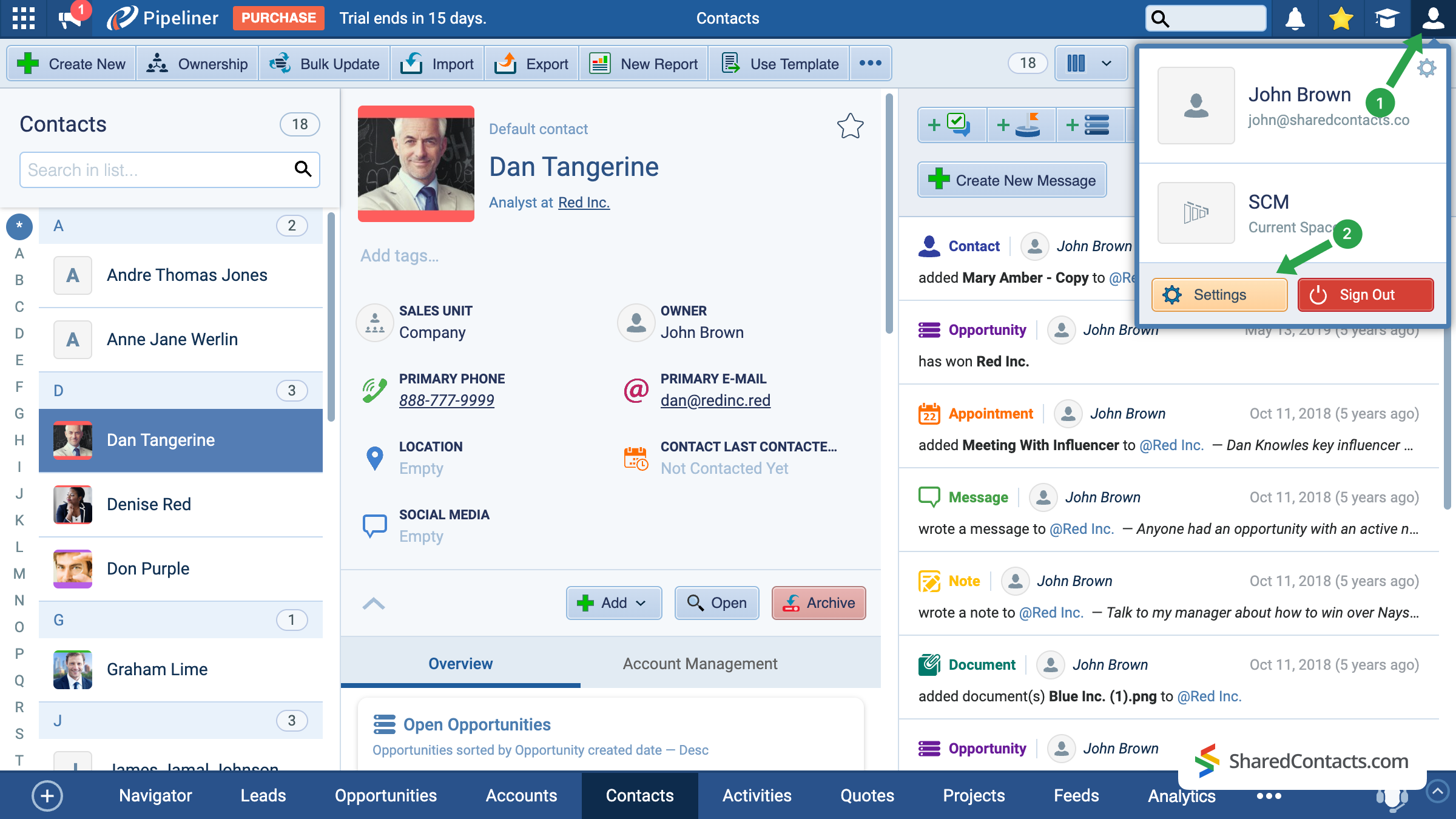
- Pipeliner 메인 화면에서 오른쪽 상단 모서리에 있는 계정 아이콘을 클릭합니다.
- 다음으로 이동 설정.
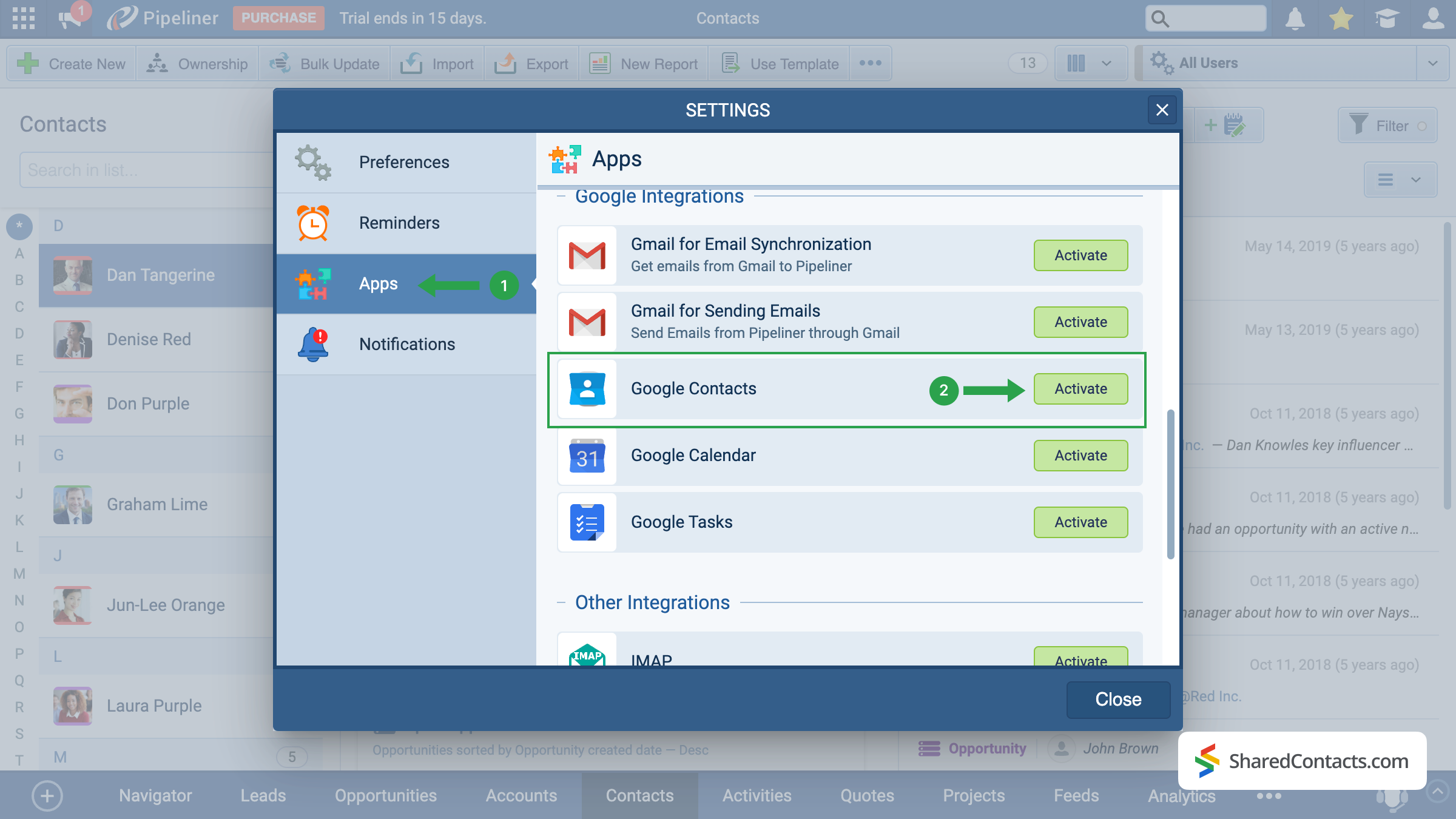
사용 가능한 설정 섹션에서 다음을 찾습니다. 애플리케이션 을 클릭하고(1), 메뉴 옵션을 아래로 스크롤한 다음 Google 연락처. 를 클릭합니다. 활성화 버튼(2)을 클릭합니다.
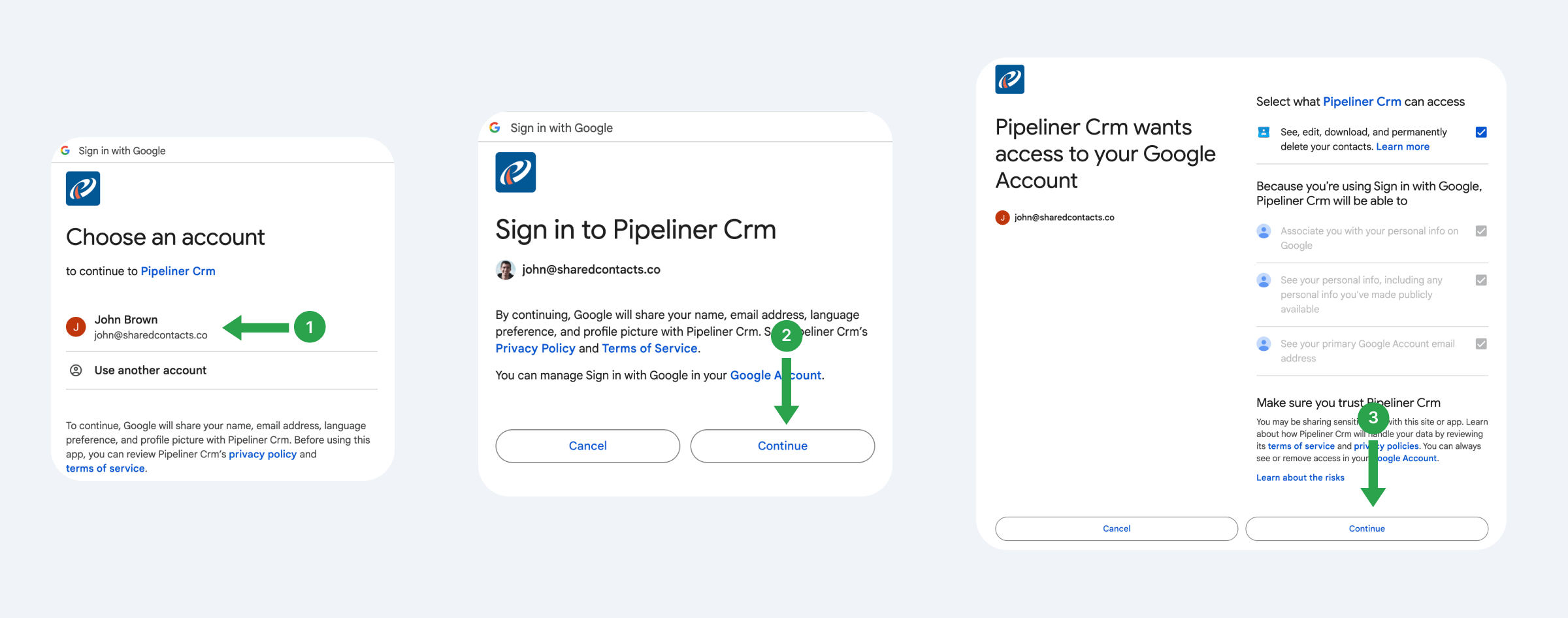
이 시스템은 향후 연락처를 사용, 추적 및 공유할 Gmail 계정을 연결할 수 있는 기능을 제공합니다.
- Google 계정을 선택합니다.
- 제안된 약관을 읽고 계속하기.
- Pipeliner가 액세스할 수 있는 항목을 확인하고 권한을 제공한 다음 계속하기.
이제 동기화 설정, 즉 Pipeliner가 Google 연락처와 정확히 어떻게 상호 작용할지 설정해 보겠습니다.
- 동기화 유형을 선택합니다. 업데이트가 양쪽 플랫폼에 모두 반영되도록 하려면 양방향 동기화를 권장합니다.
- Pipeliner에서 연락처를 보낼 기존 레이블을 선택하거나 새 레이블을 만듭니다.
- 저장을 클릭하여 구성을 적용합니다.
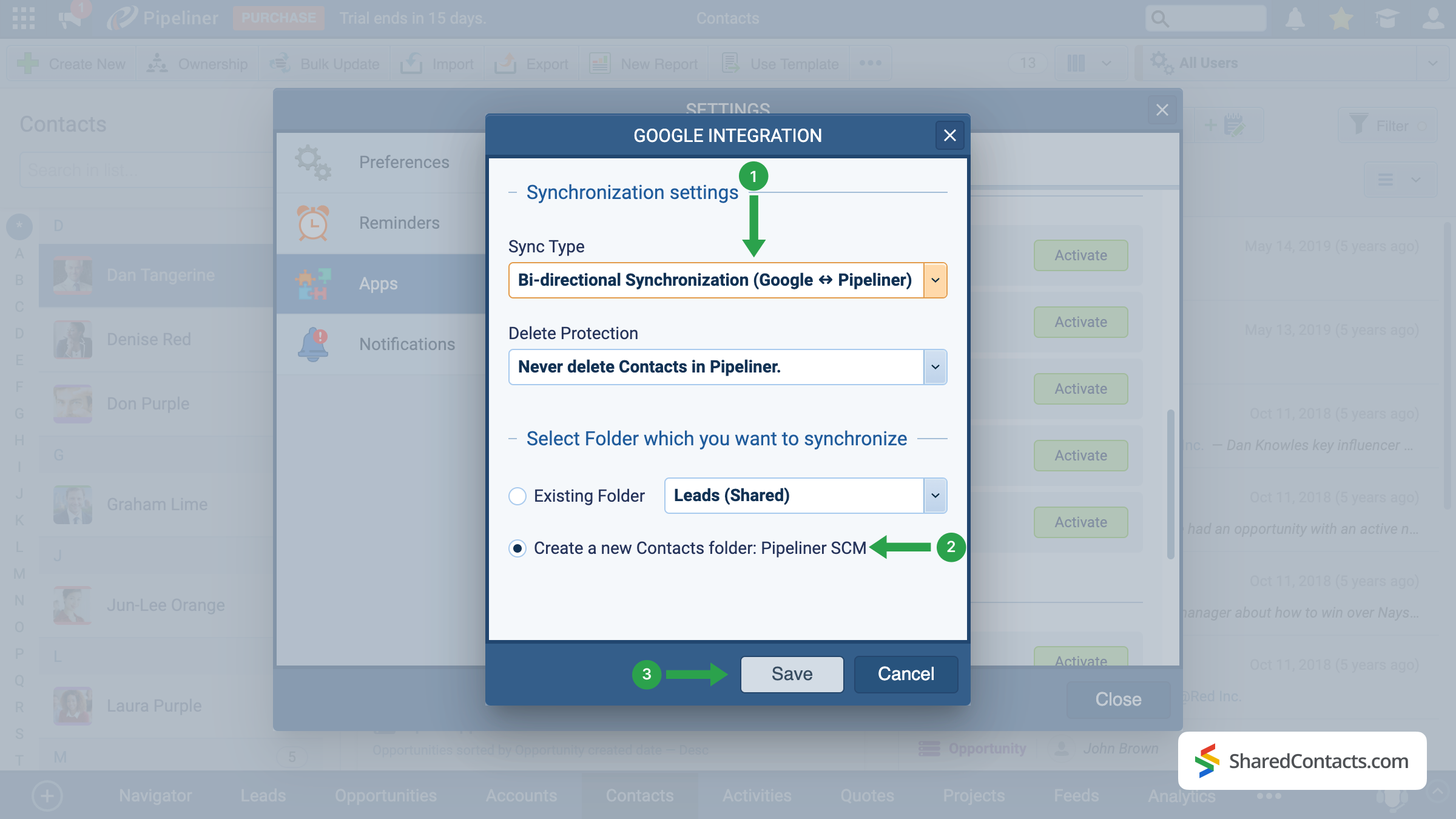
중요 참고 사항: 설정 후 추가된 새 연락처만 자동으로 동기화됩니다. 기존 연락처를 동기화하려면 내보내기 및 가져오기 함수입니다.
Share Pipeliner Contacts With the SharedContacts.com App
When the integration is successfully completed, we are ready to share your Pipeline contacts with your colleagues in a few simple clicks. To do this, access your SharedContacts.com account or 설치 아직 설치하지 않았다면 애플리케이션을 설치하세요.
이 설정을 사용하면 CRM 데이터는 효과적으로 다음과 같이 됩니다. Google 연락처 공유 ready — your team can work with the same up-to-date information directly in Google Workspace. Using SharedContacts.com on top of this integration means you’re not just syncing data, but actually controlling how it’s accessed. You can decide who gets view-only rights, who can edit details, and even share Pipeliner contacts with external partners. This turns a simple sync into a true collaboration tool, ensuring that everyone works from a single, accurate source of customer information without the need for extra CRM licenses.
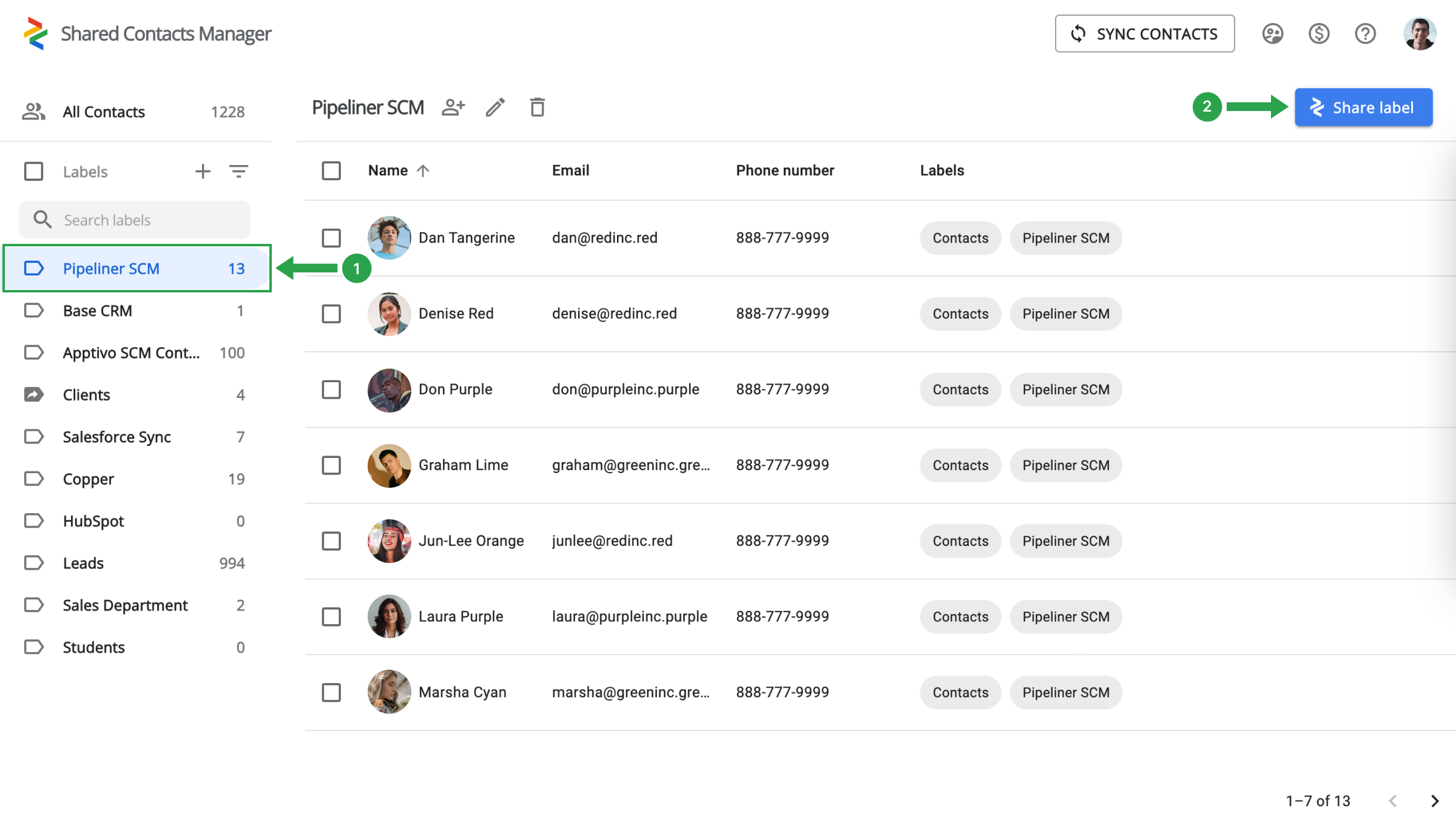
왼쪽에서 파이프라이너 연락처 폴더(1)를 선택하고 공유 라벨(2)을 클릭합니다.
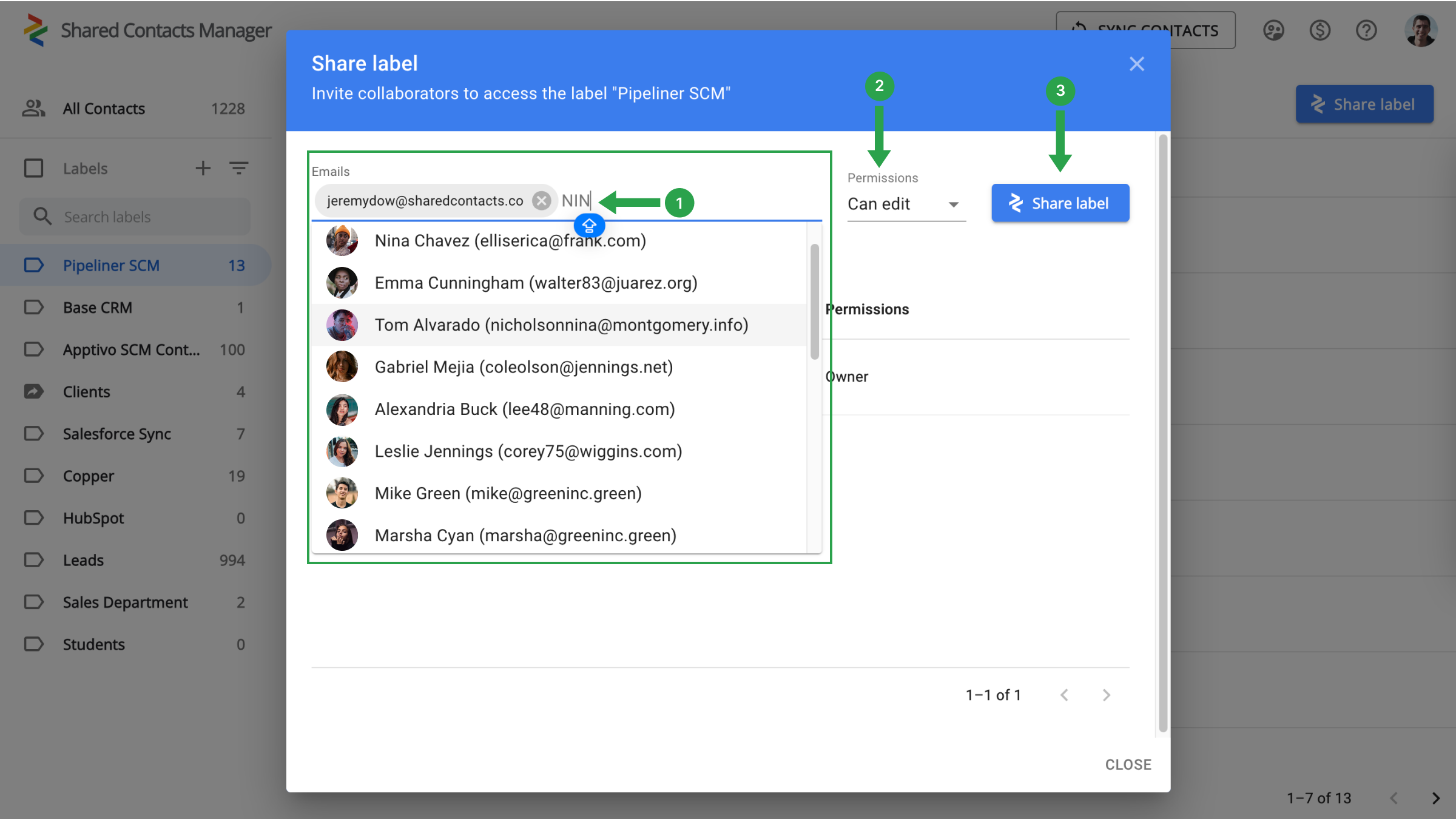
이제 연락처 액세스 권한을 부여할 동료를 선택하고, 권한 수준을 정의한 다음 공유를 시작하기만 하면 됩니다.
- 이메일 필드에서 드롭다운 목록에서 선택하거나 이메일 주소를 입력하거나 이름으로 검색하여 공동 작업자를 선택합니다.
- 권한을 할당하여 동료가 연락처로 수행할 수 있는 작업을 지정하세요.
- 레이블 공유를 클릭합니다.
구글과 파이프라이너 CRM 통합에 대한 결론
Everything is ready for a new stage in your workflow when your team’s production will skyrocket and work efficiency will increase significantly. There is no longer a need to spend thousands on CRM payments. A single setup is sufficient, and the connection with Google and SharedContacts.com will take care of the rest. Just a quick and simple setup will help you save money, simplify contact management, and significantly increase the speed and productivity of your team.
관련 문서
Google 워크스페이스를 통해 Zendesk 연락처를 동기화 및 공유하여 CRM 비용을 절감하고 워크플로우를 간소화하세요.
앱티보 연락처를 구글과 동기화 및 공유하여 CRM 비용을 최소화하세요.
댓글 없음