Synchroniseer uw Pipeliner CRM-contacten met Google en profiteer van een perfecte integratie van contactpersonen tegen bijna geen kosten

Pipeliner CRM is een robuust platform dat is ontworpen om het klantenrelatiebeheer voor bedrijven van elke grootte te consolideren. Sommige organisaties vinden echter dat de uitgebreide functies meer zijn dan wat ze nodig hebben, vooral als ze zich voornamelijk richten op het beheren van contacten. Bovendien kunnen de kosten voor individuele licenties voor elk teamlid snel oplopen, waardoor het minder haalbaar is voor kleinere bedrijven of starters.
Fortunately, there is a much more cost-effective and efficient solution for companies that require contact management capabilities. Integrating Pipeliner CRM with SharedContacts.com within Google Workspace offers a powerful alternative. This integration enables seamless sharing and updating of contacts without the zware ladingen gebonden aan meerdere CRM-licenties.
With SharedContacts.com, teams can effortlessly collaborate, accessing and managing Pipeliner CRM contacts collectively. De installatie is eenvoudig en gemakkelijk, waardoor bedrijven hun productiviteit en samenwerking kunnen verhogen zonder al te veel uit te geven.
Experience the perfect blend of powerful sales CRM capabilities and affordable contact management with Pipeliner and SharedContacts.com. Transform your workflow and boost your team’s efficiency with just a few simple steps.
Pipeliner instellen voor integratie met Google Contacten
Pipeliner heeft native functionaliteit voor integratie met Google Contacten, waardoor het proces heel eenvoudig is en er geen software van derden nodig is. De installatie neemt slechts enkele minuten in beslag.
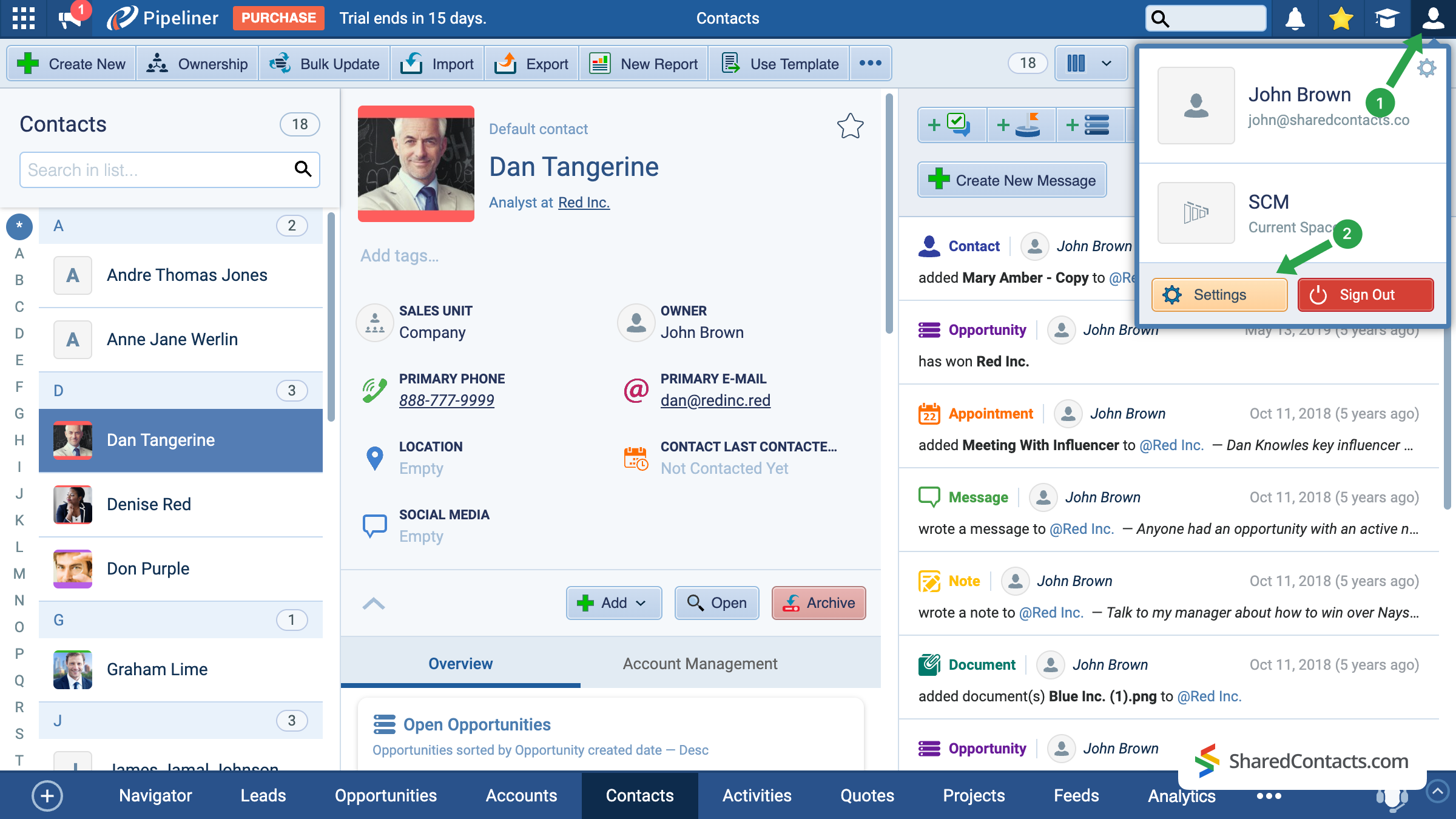
- Klik op het hoofdscherm van Pipeliner op het accountpictogram in de rechterbovenhoek.
- Ga naar Instellingen.
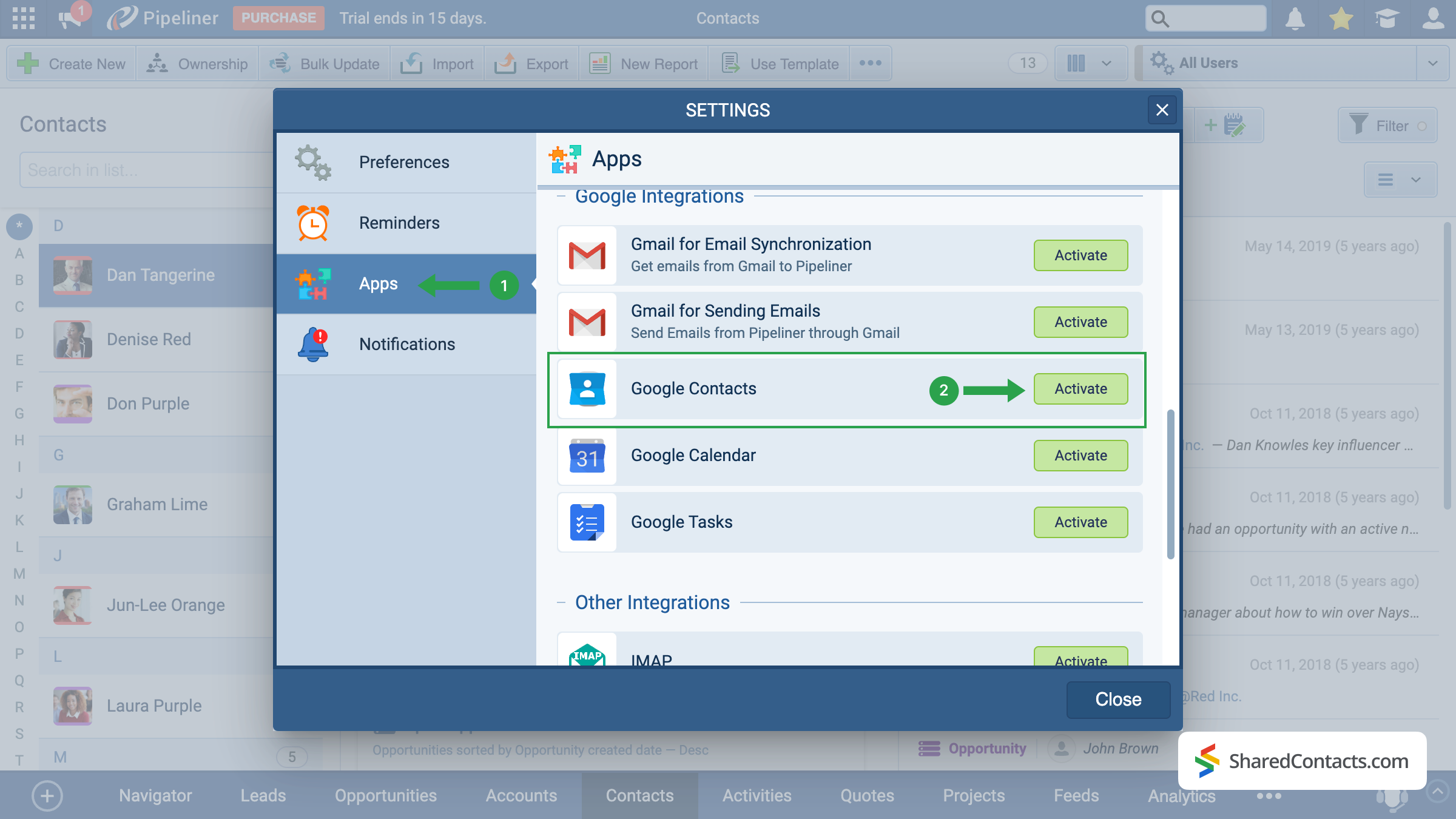
Onder de beschikbare instellingensecties vindt u Toepassingen aan de linkerkant van het scherm (1), scrol omlaag door de menuopties en zoek naar Google Contacten. Klik op de Activeer knop (2).
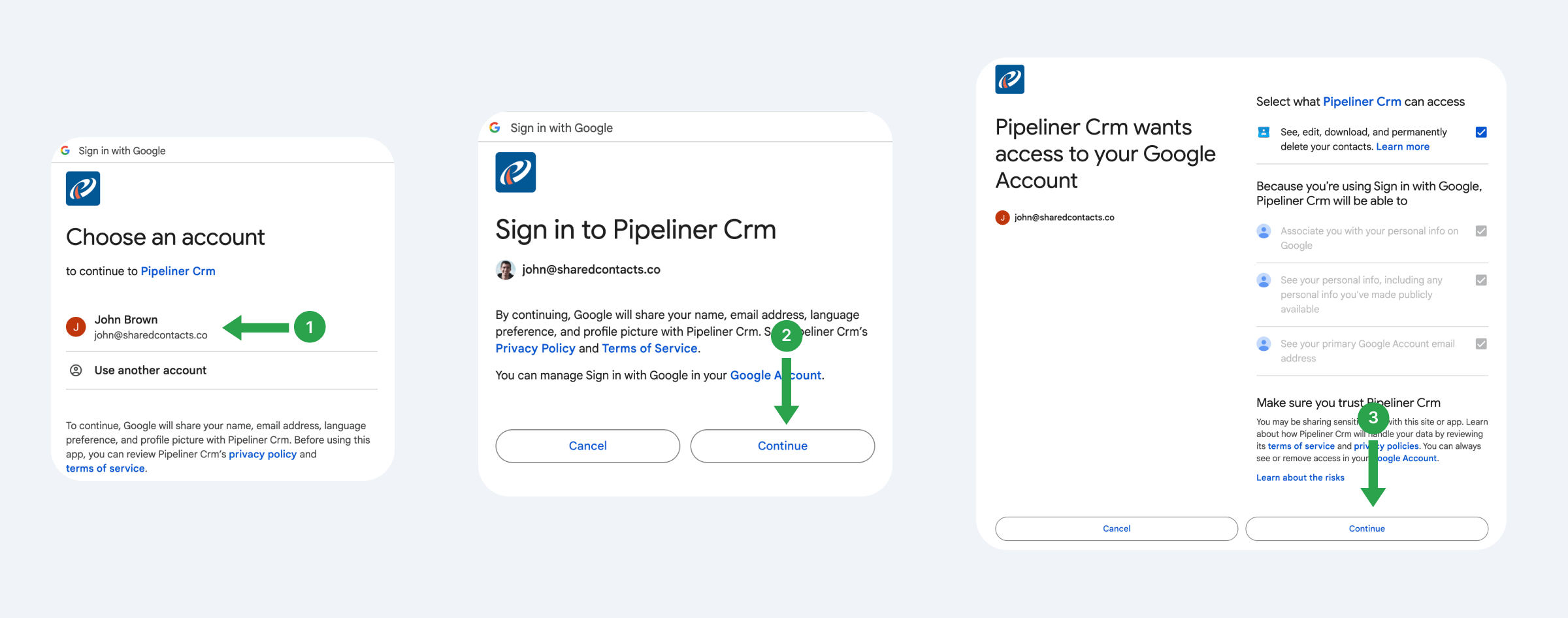
Het systeem biedt je de mogelijkheid om de Gmail-account te koppelen van waaruit je in de toekomst contactpersonen wilt gebruiken, volgen en delen.
- Kies een Google-account.
- Lees de voorgestelde voorwaarden en klik Ga verder.
- Bekijk waar Pipeliner toegang toe heeft, geef rechten en klik op Ga verder.
Laten we nu de synchronisatie-instellingen instellen, dat wil zeggen, hoe we precies willen dat Pipeliner communiceert met Google Contacten.
- Selecteer het Sync Type. We raden tweerichtingssynchronisatie aan om ervoor te zorgen dat updates op beide platforms worden weergegeven.
- Kies een bestaand label waar je contacten van Pipeliner naartoe wilt sturen of maak een nieuw label aan.
- Klik op Opslaan om uw configuratie toe te passen.
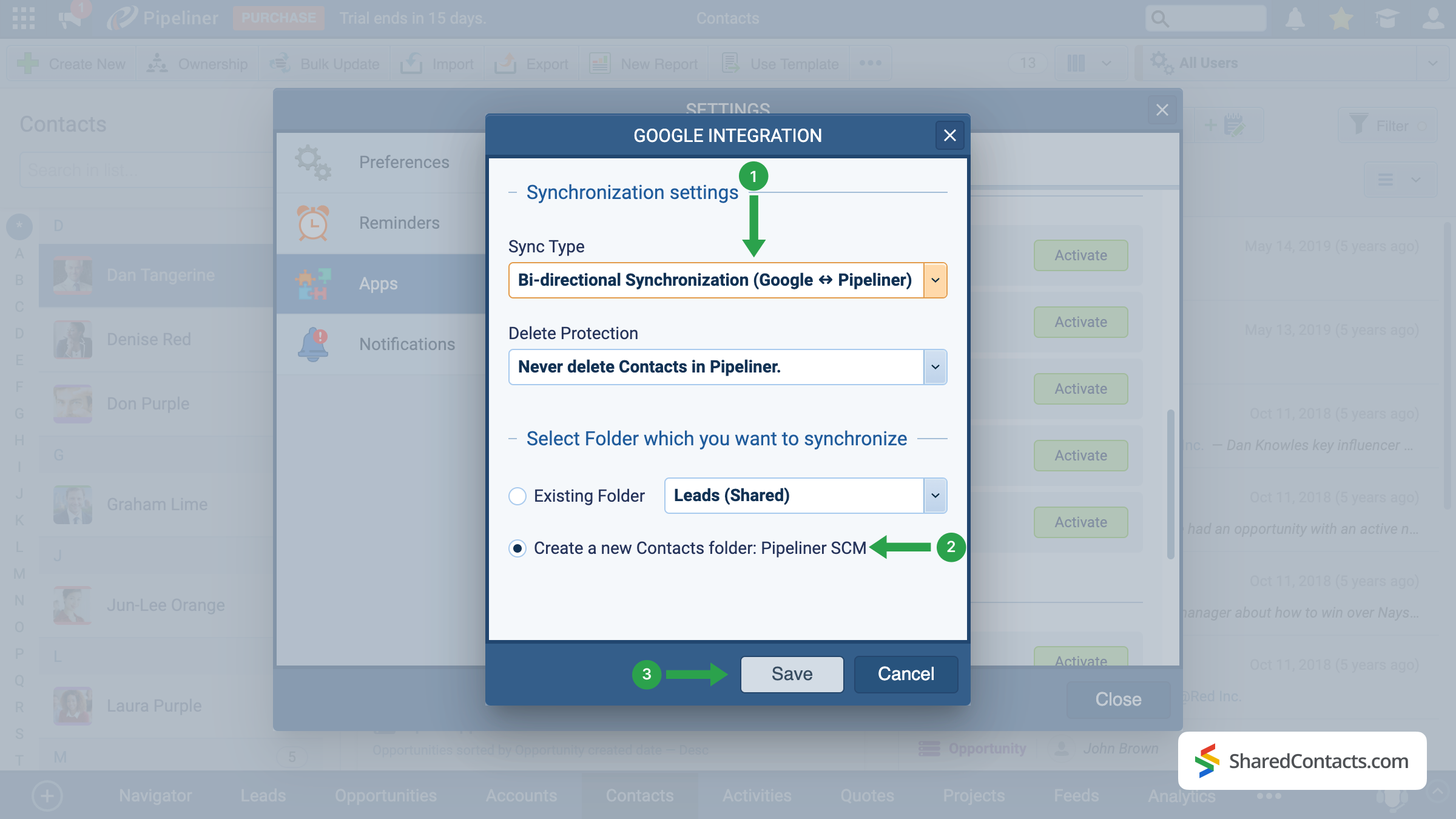
Belangrijke opmerking: Alleen nieuwe contacten die na de installatie zijn toegevoegd, worden automatisch gesynchroniseerd. Als u bestaande contacten wilt synchroniseren, gebruikt u de export- en importeer functie in Pipeliner.
Share Pipeliner Contacts With the SharedContacts.com App
When the integration is successfully completed, we are ready to share your Pipeline contacts with your colleagues in a few simple clicks. To do this, access your SharedContacts.com account or installeren de applicatie als je dat nog niet hebt gedaan.
With this setup, your CRM data effectively becomes Google contacts share ready — your team can work with the same up-to-date information directly in Google Workspace. Using SharedContacts.com on top of this integration means you’re not just syncing data, but actually controlling how it’s accessed. You can decide who gets view-only rights, who can edit details, and even share Pipeliner contacts with external partners. This turns a simple sync into a true collaboration tool, ensuring that everyone works from a single, accurate source of customer information without the need for extra CRM licenses.
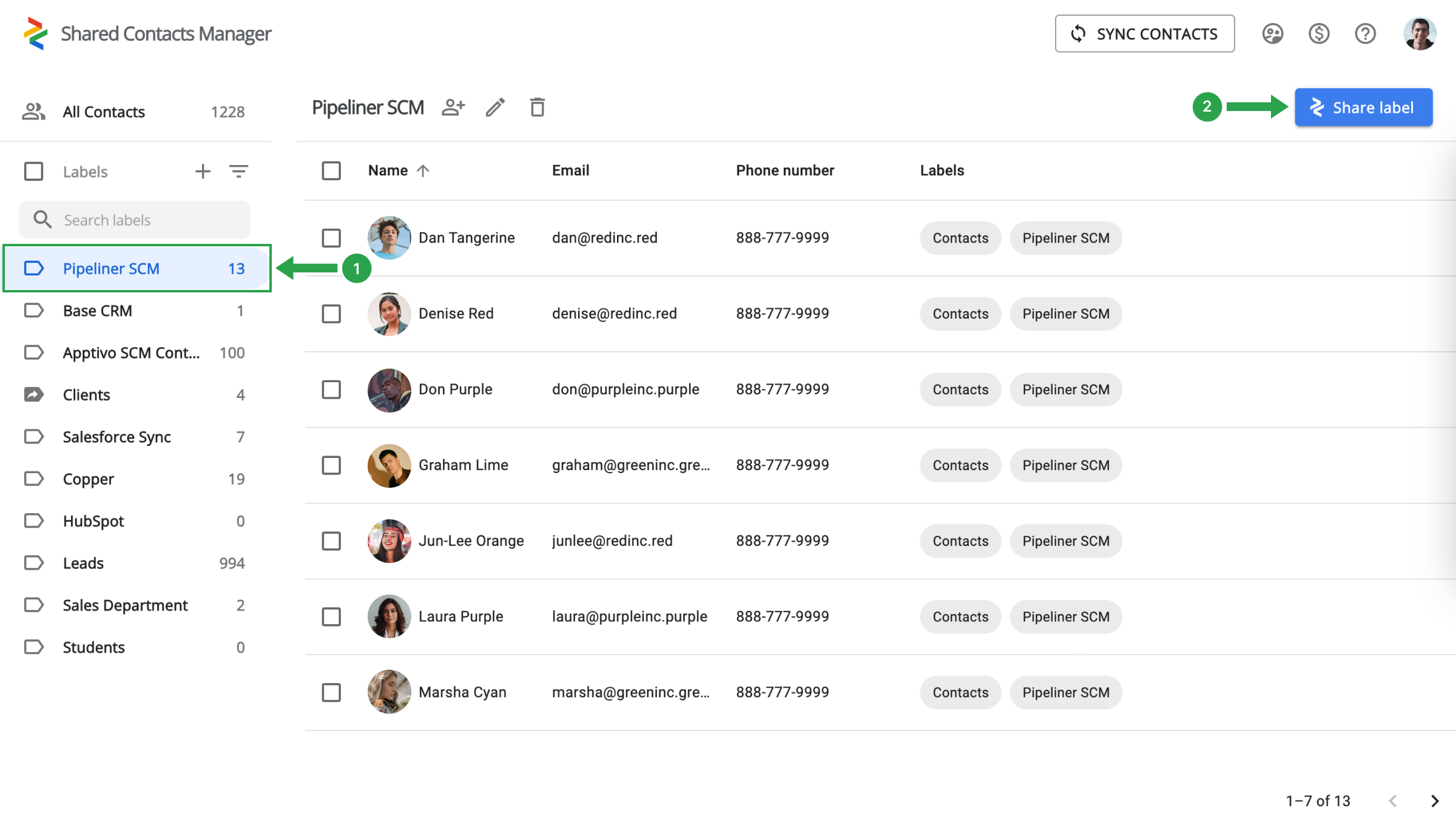
Selecteer de Pipeliner contactmap (1) aan de linkerkant en klik op label delen (2).
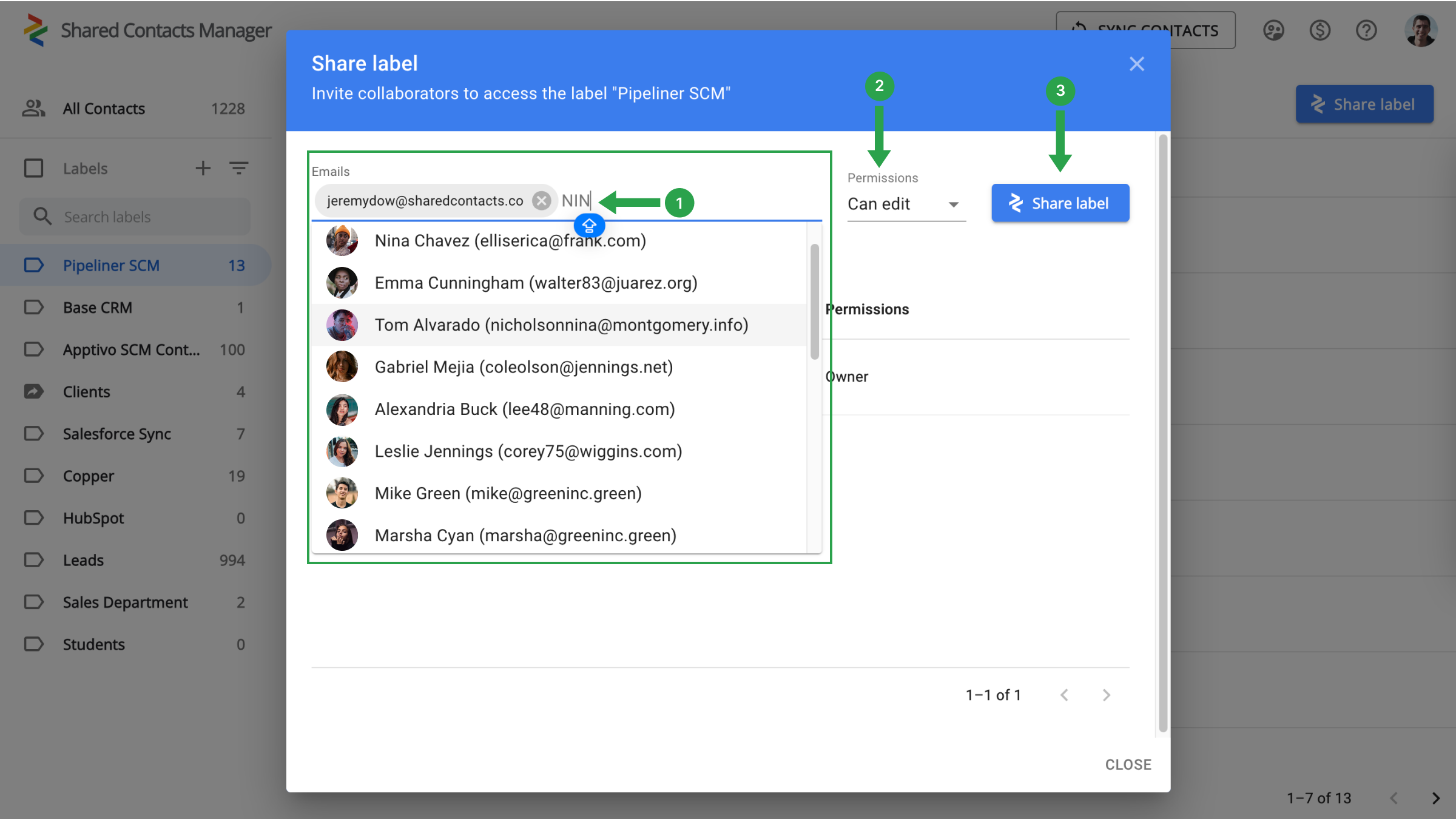
Je hoeft alleen nog maar je collega's te kiezen aan wie je toegang wilt geven tot contactpersonen, het niveau van machtigingen te bepalen en te beginnen met delen.
- Kies je medewerkers in het veld E-mails door ze te selecteren in de vervolgkeuzelijst, hun e-mailadres in te voeren of te zoeken op naam.
- Wijs machtigingen toe om aan te geven welke acties je collega's mogen uitvoeren met de contactpersonen.
- Klik op Label delen.
Conclusie over Google en Pipeliner CRM integratie
Everything is ready for a new stage in your workflow when your team’s production will skyrocket and work efficiency will increase significantly. There is no longer a need to spend thousands on CRM payments. A single setup is sufficient, and the connection with Google and SharedContacts.com will take care of the rest. Just a quick and simple setup will help you save money, simplify contact management, and significantly increase the speed and productivity of your team.
Verwante artikelen

Zendesk-contacten synchroniseren en delen via Google Workspace, CRM-kosten besparen en workflow stroomlijnen

Synchroniseer en deel Apptivo Contacten met Google en minimaliseer CRM rekeningen

Geen reacties