Synchronizuj kontakty Copper CRM przez Google Workspace i oszczędzaj na opłatach licencyjnych CRM

Copper CRM to doskonałe i wysoce funkcjonalne oprogramowanie do zarządzania relacjami z klientami. Jednak dla wielu organizacji może nie być najlepszym rozwiązaniem, zwłaszcza jeśli nie wymagają rozbudowanych funkcji, które oferują CRM takie jak Copper. Firmy poszukujące przede wszystkim rozwiązania do zarządzania kontaktami z klientami często obciążają się nadmierną liczbą funkcji i wysokie koszty licencji związane z CRM, które wymagają oddzielnych licencji dla każdego członka zespołu.
Yet, there is a more affordable and suitable way for such companies to organize and manage their interactions with clients. SharedContacts.com offers a fantastic alternative to CRMs like Copper. It provides several key benefits, including affordability, as it does not require a separate license for every team member. This makes it accessible for businesses with tight budgets. The tool ensures streamlined collaboration among co-workers, allowing everyone to access, update, and share contact information easily. With Copper and Google Contacts integration, users can manage contacts directly on their mobile devices, enhancing usability and mobility. The interface is user-friendly and familiar, reducing the learning curve and enabling quick adoption by new users. By turning your CRM data into Udostępnione kontakty Google, the app makes it simple for your whole team to collaborate easily inside your Google ecosystem.
SharedContacts.com is a cost-effective, collaborative, and convenient alternative for businesses focused on efficient contact management without the high costs and complexity of CRMs like Copper, and it takes mere minutes to install it and enjoy its functionality.
Integracja Copper z Google
Integracja między Copper i Google jest prosta i obejmuje tylko kilka kroków. Aby ją skonfigurować, zaloguj się na swoje konto CRM i postępuj zgodnie z poniższymi instrukcjami:
- W menu po lewej stronie pulpitu nawigacyjnego Copper kliknij przycisk Ustawienia.
- W górnej części ekranu znajdź i kliknij Skonfiguruj Google, a następnie wybierz Ustawienia synchronizacji Google.
- Zaznacz pole oznaczone 1-kierunkowa synchronizacja kontaktów Google.
Wykonując te kroki, Copper utworzy dedykowany folder w Kontaktach Google. Wszelkie nowe dane wprowadzone do CRM będą automatycznie synchronizowane z kontem Google.
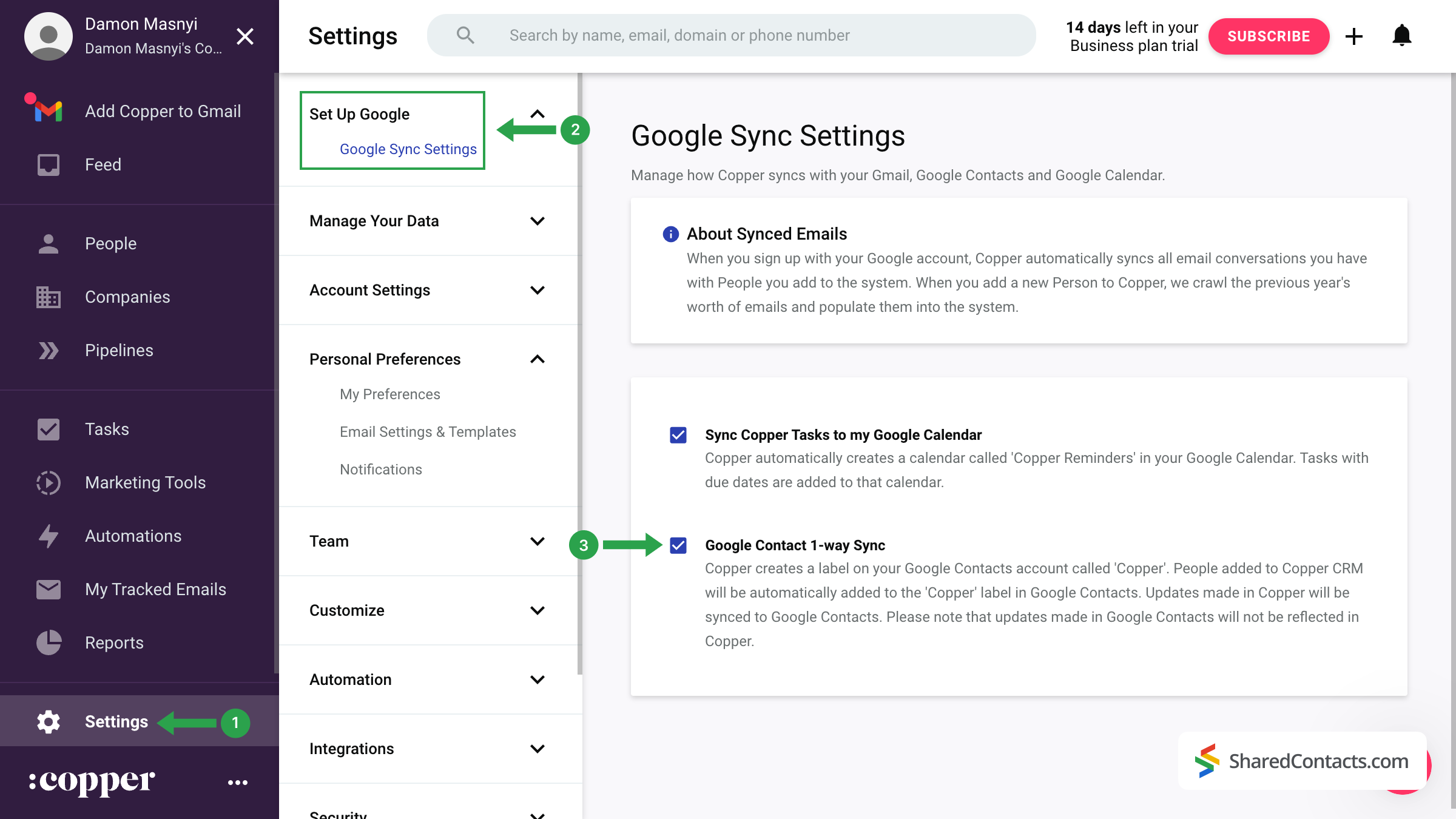
Ważna uwaga: Początkowa synchronizacja nie jest natychmiastowa. Jeśli od razu nie zobaczysz etykiety "Copper" w Kontaktach Google, nie martw się. Pełna synchronizacja może potrwać od kilku do 24 godzin.
Share Copper Contacts With SharedContacts.com
Once your contacts have been successfully transferred from Copper CRM to Google Contacts, you can share them with colleagues and team members using the SharedContacts.com application.
Access your SharedContacts.com account. If you don’t have the app installed, click tutaj aby łatwo go zainstalować.
- W menu po lewej stronie znajdź etykietę "Copper", gdzie przechowywane są wszystkie zsynchronizowane kontakty i wybierz ją.
- Kliknij przycisk Etykieta udostępniania przycisk.
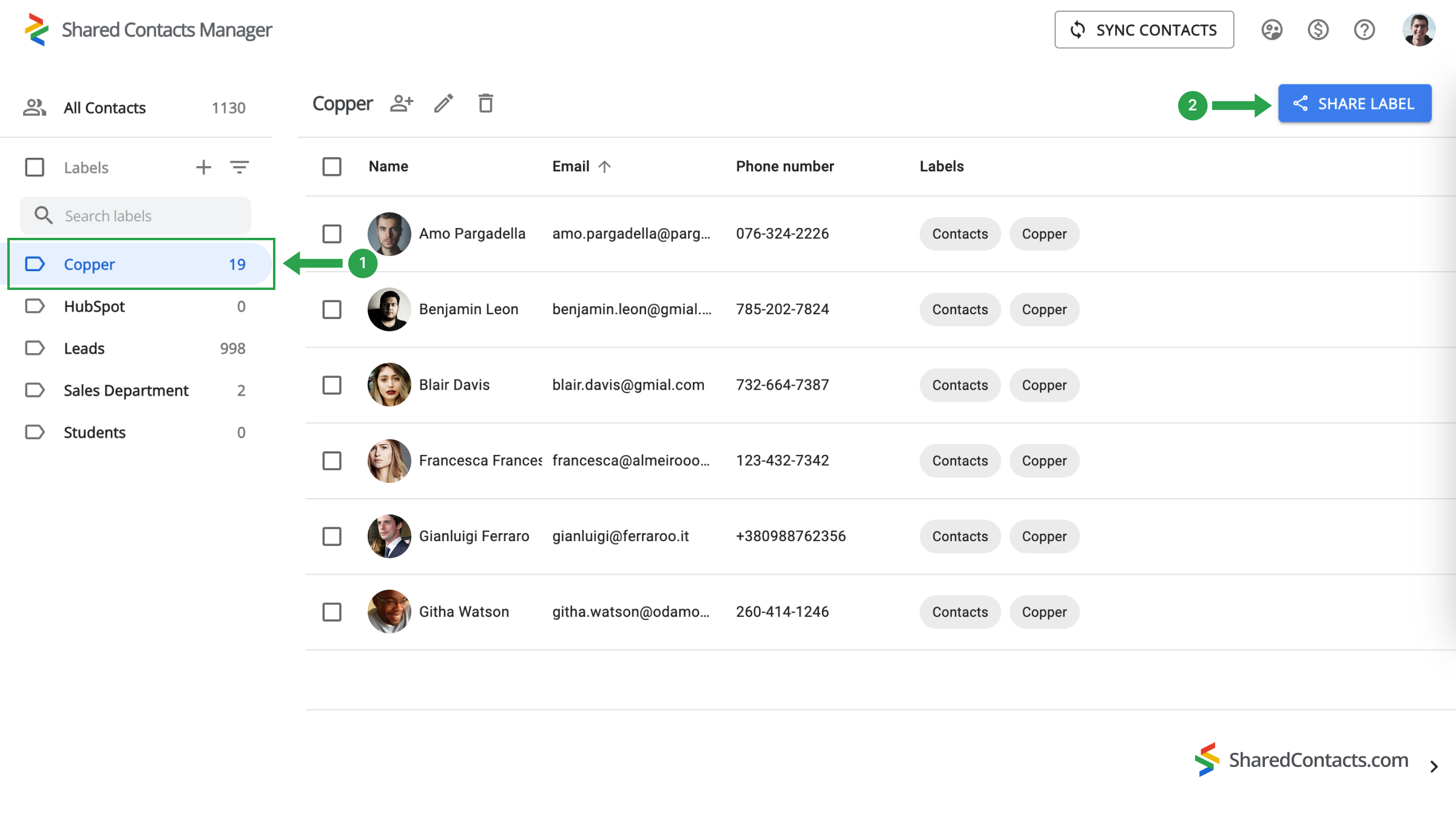
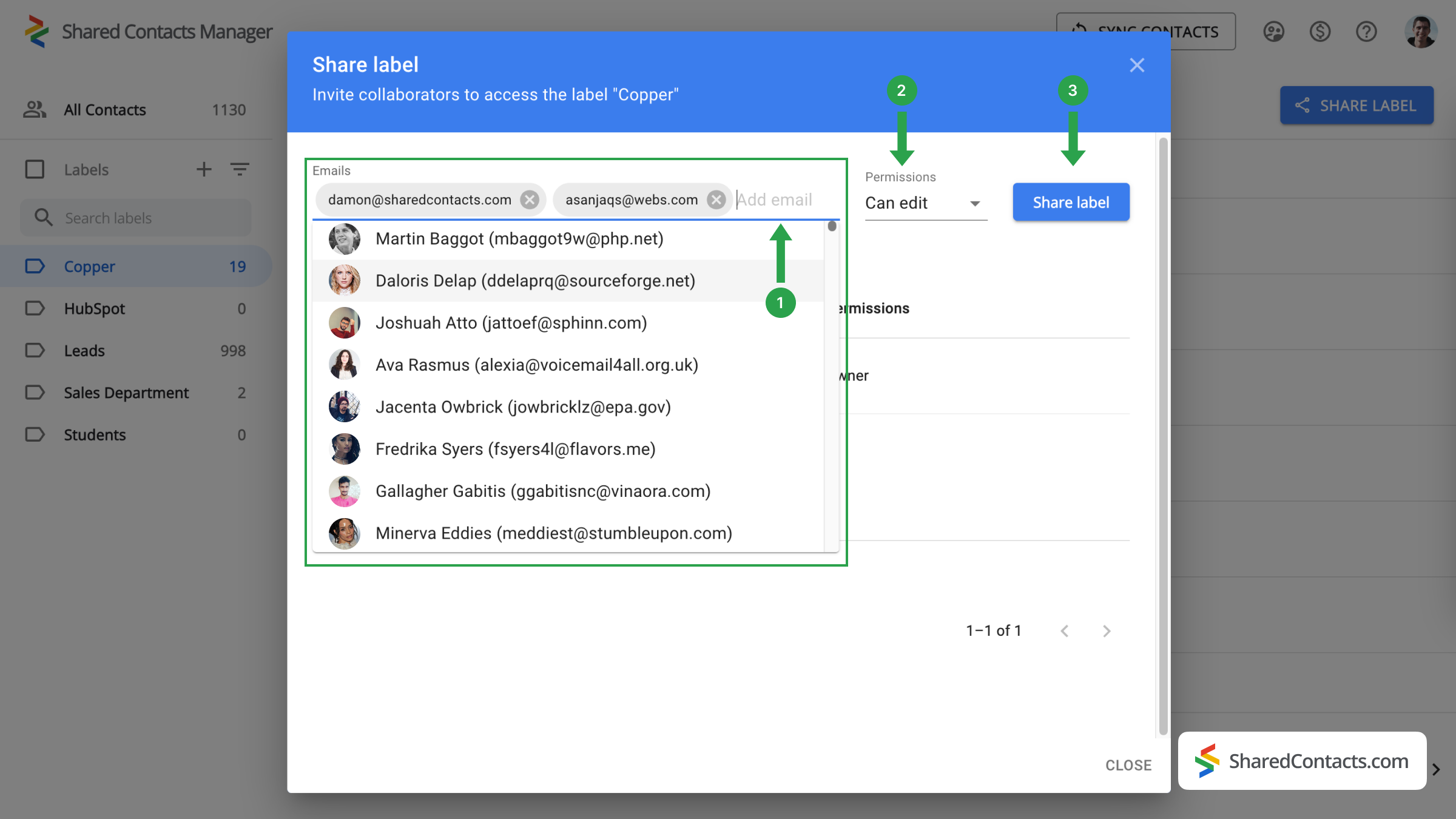
W następnym oknie zostaniesz poproszony o wybranie osób, którym chcesz przyznać dostęp i określenie ich uprawnień.
- W E-maile Dodaj współpracowników, wybierając ich z listy, wpisując ich imiona i nazwiska lub adresy e-mail.
- Wybierz odpowiedni poziom uprawnień dla każdego członka zespołu spośród dostępnych opcji.
- Kliknij Etykieta udostępniania aby zakończyć proces.
Teraz każdy, komu dałeś dostęp do swoich kontaktów Copper, będzie mógł je przeglądać i używać zgodnie z ustawionymi uprawnieniami.
Wnioski dotyczące integracji Copper i Kontaktów Google
In summary, while Copper CRM offers a robust suite of features for managing customer relationships, it may not be flawless for organizations focused primarily on contact management. SharedContacts.com, on the other hand, provides a cost-effective and efficient alternative, allowing businesses to manage contacts without the burden of multiple licenses. Integration with Google Contacts improves collaboration, making it easy for team members to access and share contact information, and the user-friendly interface ensures quick adoption and ease of use.
By choosing SharedContacts.com, businesses can enjoy a clearer, more affordable approach to contact management, ensuring they stay organized and efficient without incurring the high costs associated with traditional CRMs like Copper.
Powiązane artykuły
Zsynchronizuj kontakty Pipeliner CRM z Google i korzystaj z doskonałej integracji kontaktów niemal bez żadnych kosztów
Synchronizuj i udostępniaj kontakty Zendesk za pośrednictwem Google Workspace, oszczędzając na kosztach CRM i usprawniając przepływ pracy
Brak komentarzy