Synkroniser dine Pipeliner CRM-kontakter med Google, og få glæde af perfekt kontaktintegration næsten uden omkostninger

Pipeliner CRM er en robust platform, der er designet til at konsolidere administrationen af kunderelationer for virksomheder i alle størrelser. Nogle organisationer kan dog opleve, at de omfattende funktioner er mere, end de har brug for, især hvis de primært fokuserer på at administrere kontakter. Derudover kan omkostningerne i forbindelse med individuelle licenser til hvert teammedlem hurtigt løbe op, hvilket gør det mindre muligt for mindre virksomheder eller startups.
Fortunately, there is a much more cost-effective and efficient solution for companies that require contact management capabilities. Integrating Pipeliner CRM with SharedContacts.com within Google Workspace offers a powerful alternative. This integration enables seamless sharing and updating of contacts without the tunge afgifter bundet til flere CRM-licenser.
With SharedContacts.com, teams can effortlessly collaborate, accessing and managing Pipeliner CRM contacts collectively. Opsætningen er enkel og let, så virksomheder kan øge produktiviteten og samarbejdet uden at bruge for mange penge.
Experience the perfect blend of powerful sales CRM capabilities and affordable contact management with Pipeliner and SharedContacts.com. Transform your workflow and boost your team’s efficiency with just a few simple steps.
Opsæt Pipeliner til integration af Google Kontakter
Pipeliner har indbygget funktionalitet til integration med Google Kontakter, hvilket gør processen meget enkel og eliminerer behovet for tredjepartssoftware. Opsætningen tager kun et par minutter.
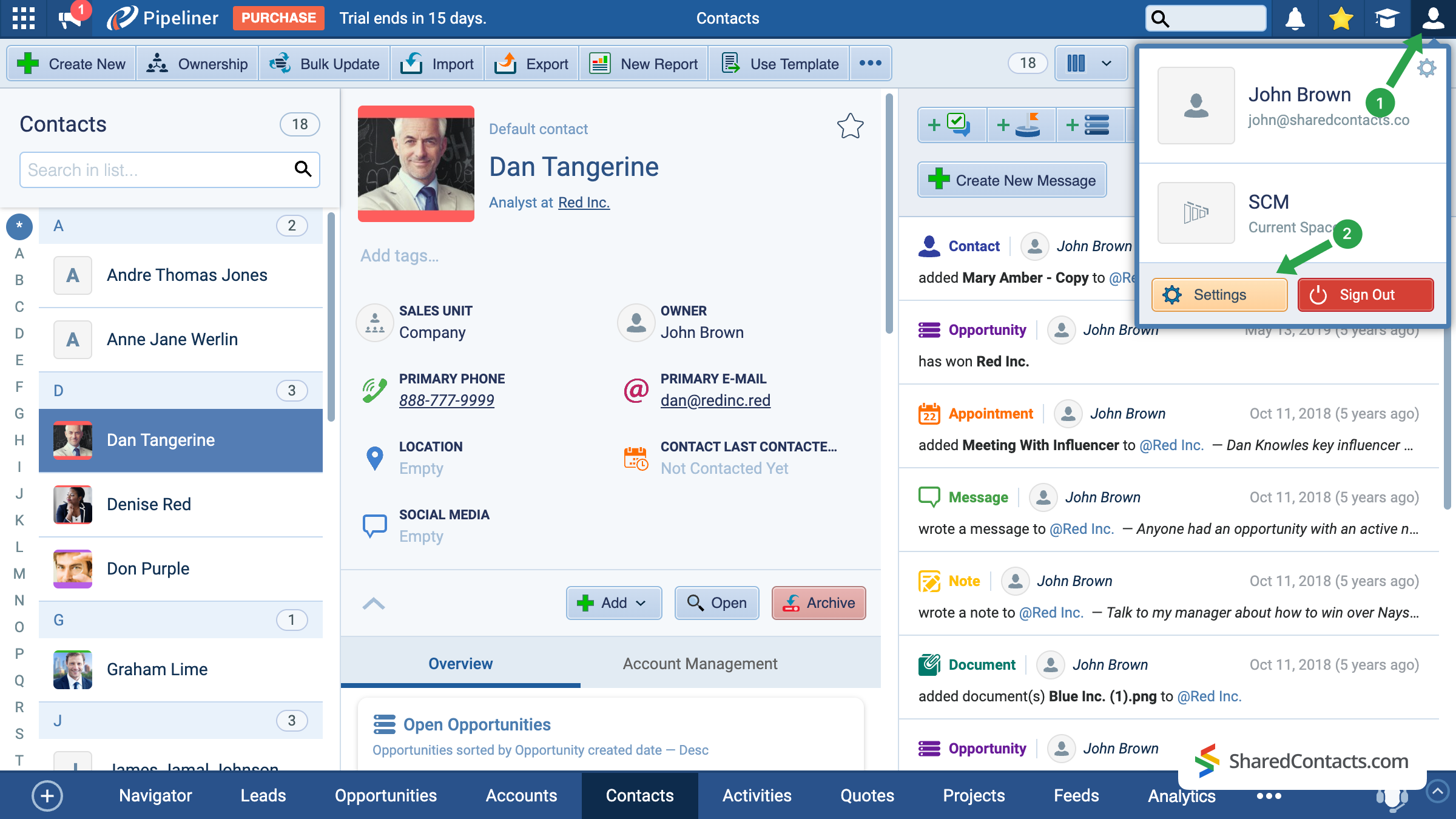
- På Pipeliners hovedskærm skal du klikke på dit kontoikon i øverste højre hjørne.
- Gå til Indstillinger.
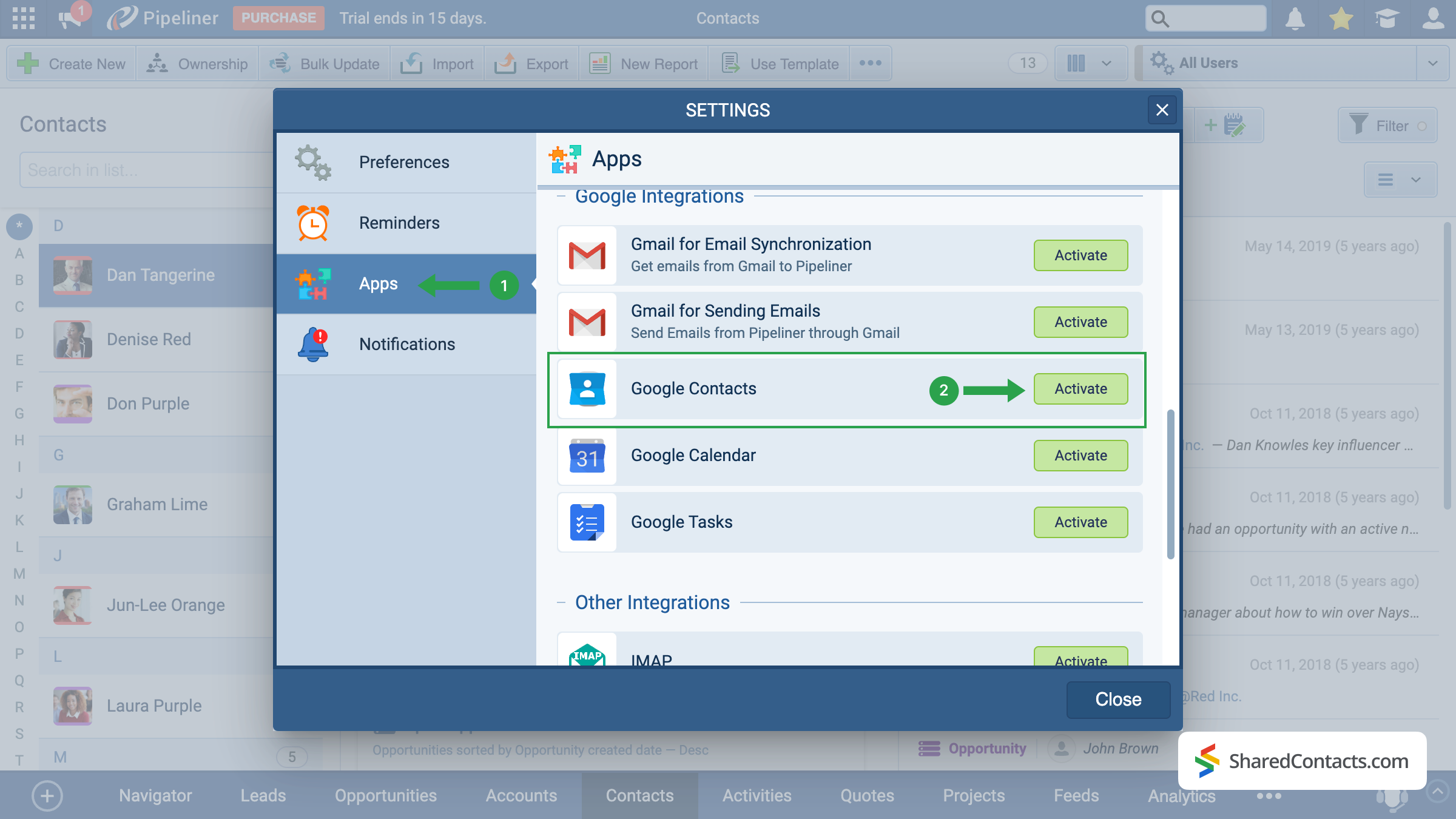
Blandt de tilgængelige indstillingssektioner finder du Anvendelser i venstre side af skærmen (1), rul ned gennem menuerne, og find Google Kontakter. Klik på Aktiver knap (2).
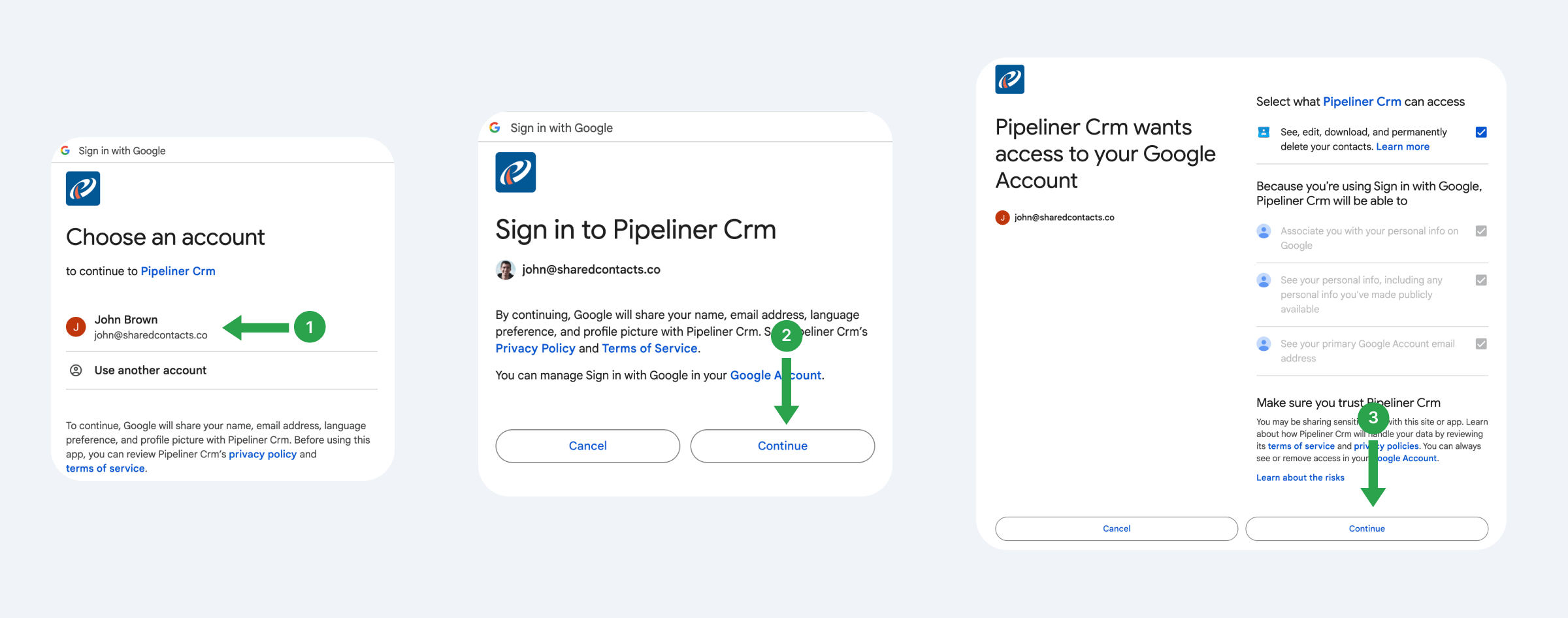
Systemet vil tilbyde dig at forbinde den Gmail-konto, hvorfra du planlægger at bruge, spore og dele kontakter i fremtiden.
- Vælg en Google-konto.
- Læs de foreslåede vilkår og klik Fortsæt.
- Se, hvad Pipeliner skal have adgang til, giv tilladelser, og klik på Fortsæt.
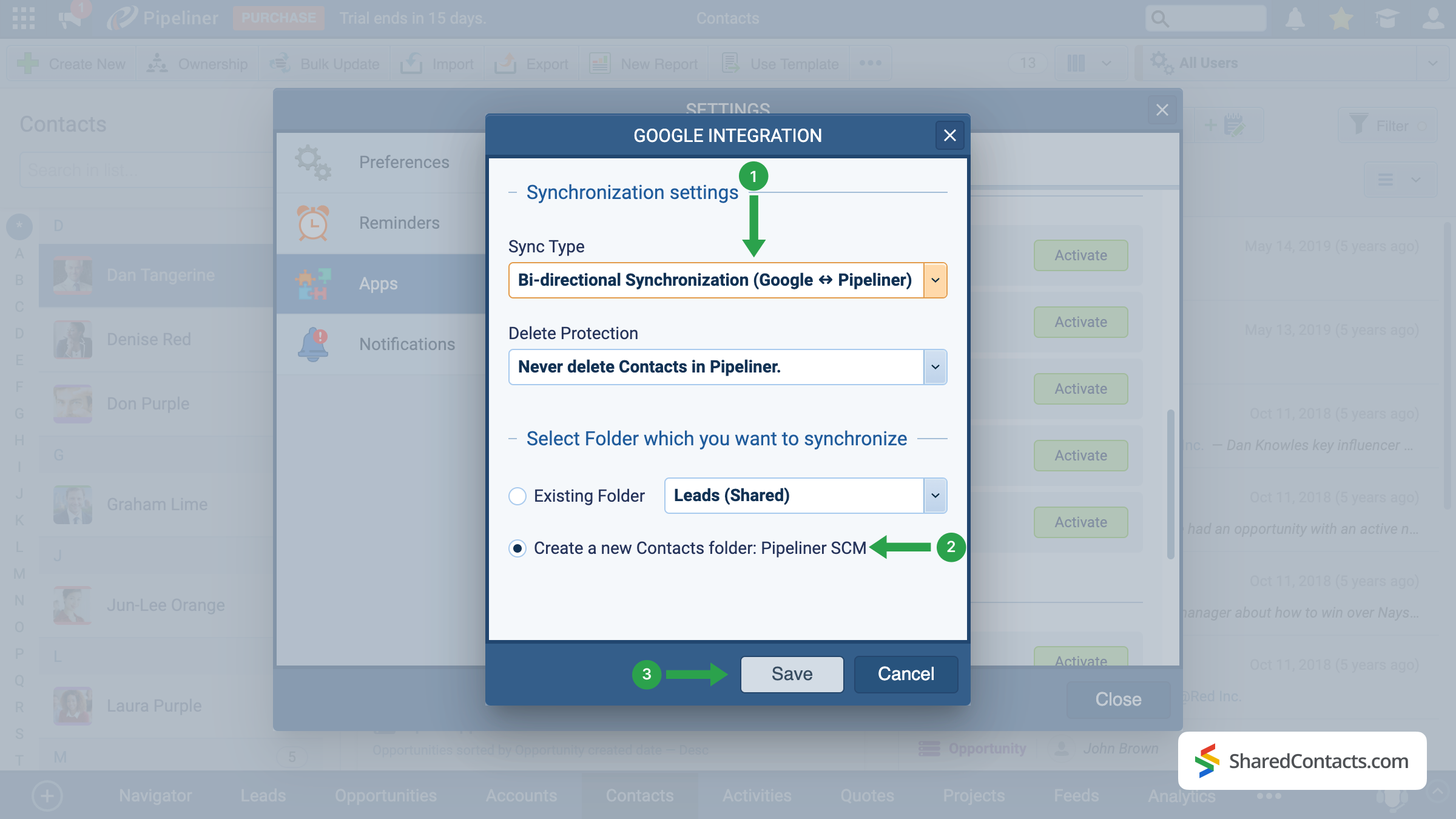
Lad os nu indstille synkroniseringsindstillingerne, dvs. hvordan vi ønsker, at Pipeliner skal interagere med Google Kontakter.
- Vælg synkroniseringstype. Vi anbefaler tovejssynkronisering for at sikre, at opdateringer afspejles på begge platforme.
- Vælg en eksisterende label, hvor du vil sende kontakter fra Pipeliner, eller opret en ny.
- Klik på Gem for at anvende din konfiguration.
Vigtig bemærkning: Kun nye kontakter, der er tilføjet efter opsætningen, synkroniseres automatisk. For at synkronisere allerede eksisterende kontakter skal du bruge eksport- og Import funktion i Pipeliner.
Share Pipeliner Contacts With the SharedContacts.com App
When the integration is successfully completed, we are ready to share your Pipeline contacts with your colleagues in a few simple clicks. To do this, access your SharedContacts.com account or installere ansøgningen, hvis du ikke allerede har gjort det.
With this setup, your CRM data effectively becomes Google contacts share ready — your team can work with the same up-to-date information directly in Google Workspace. Using SharedContacts.com on top of this integration means you’re not just syncing data, but actually controlling how it’s accessed. You can decide who gets view-only rights, who can edit details, and even share Pipeliner contacts with external partners. This turns a simple sync into a true collaboration tool, ensuring that everyone works from a single, accurate source of customer information without the need for extra CRM licenses.
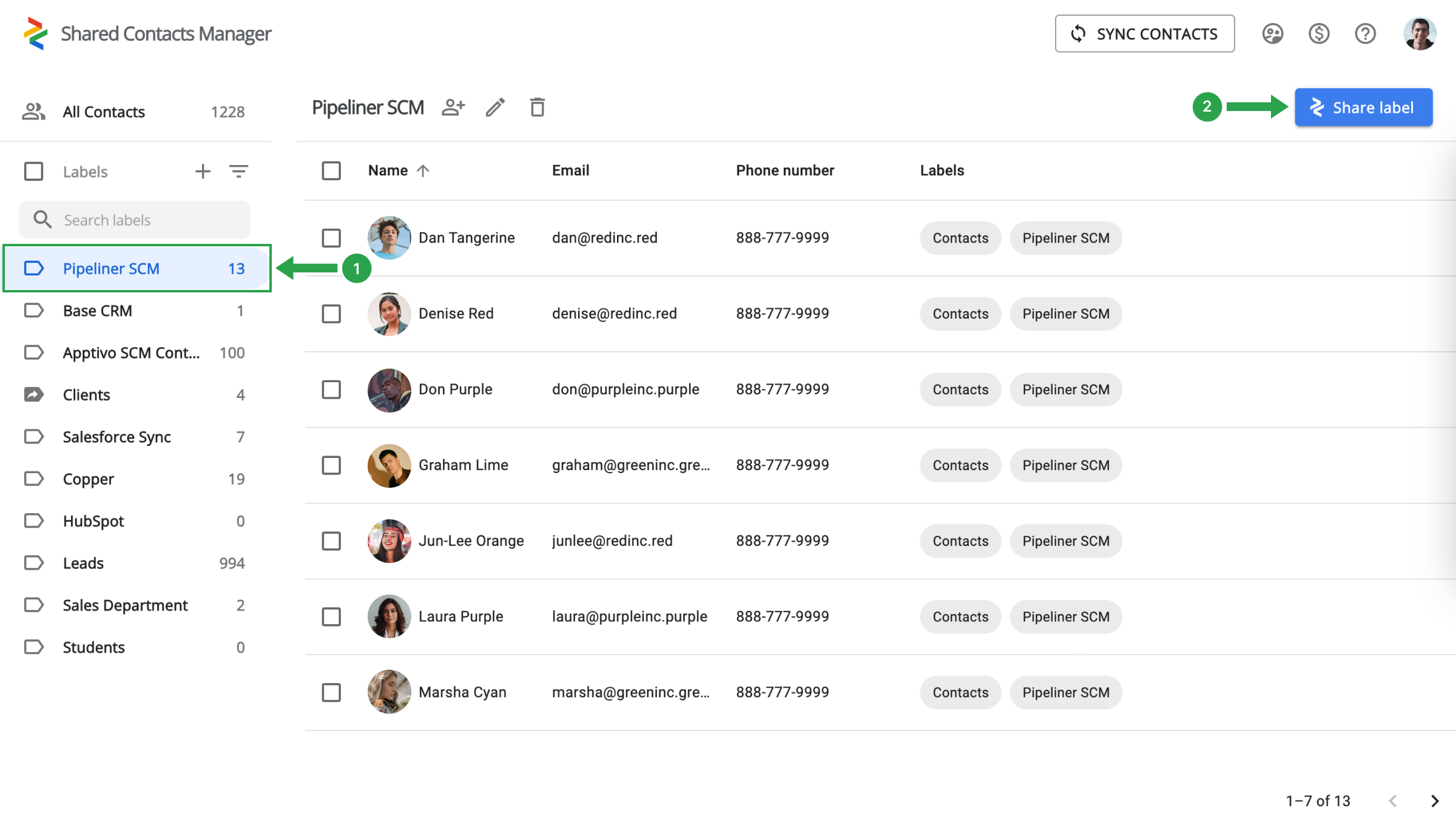
Vælg Pipeliner-kontaktmappen (1) til venstre, og klik på Share label (2).
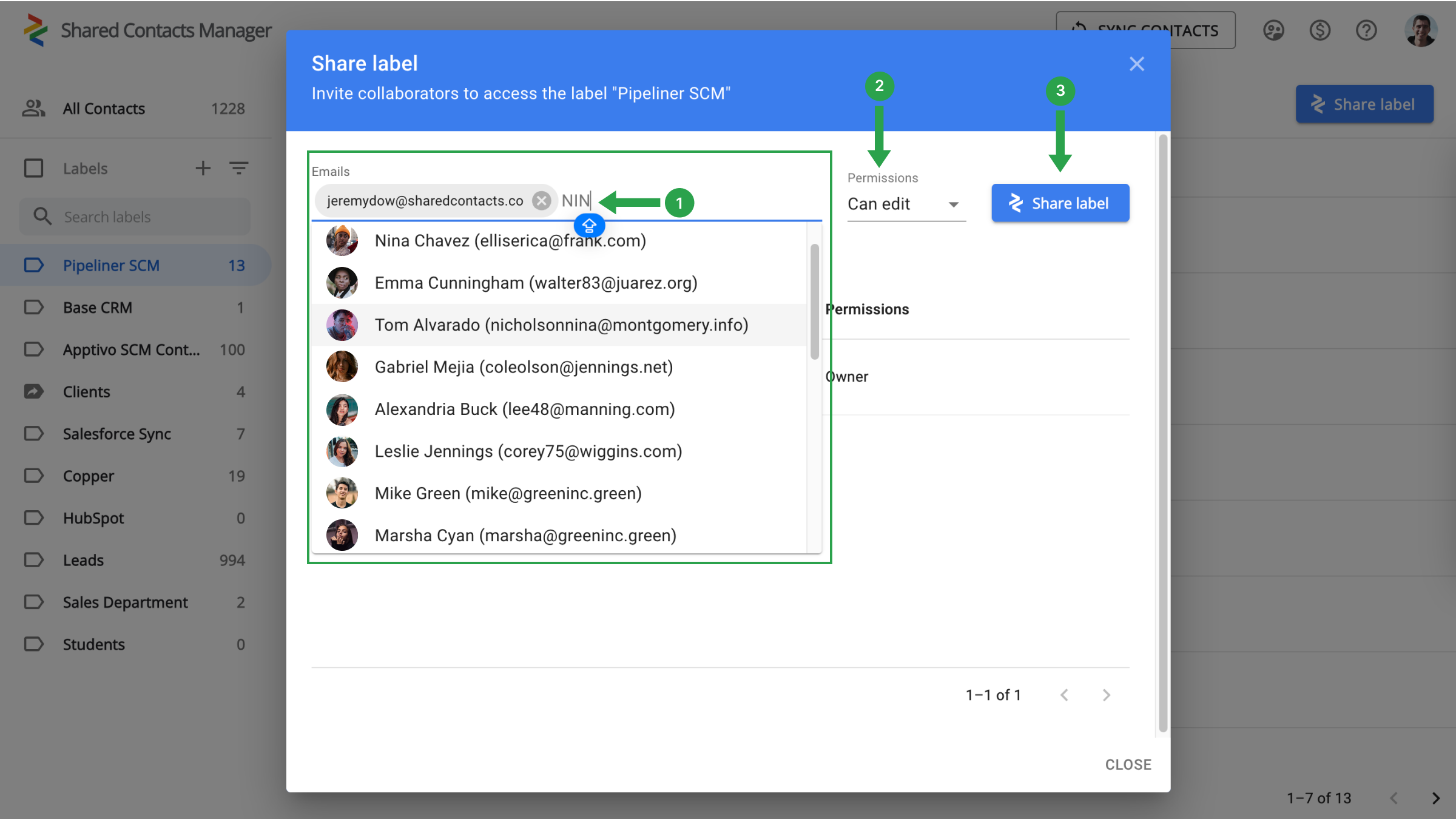
Det eneste, du skal gøre, er at vælge dine kolleger, som du vil give adgang til kontakter, definere niveauet for tilladelser og begynde at dele.
- I feltet E-mails kan du vælge dine samarbejdspartnere ved at vælge fra rullelisten, indtaste deres e-mailadresser eller søge på navn.
- Tildel tilladelser for at specificere de handlinger, dine kolleger kan udføre med kontakterne.
- Klik på Share Label.
Konklusion på integration af Google og Pipeliner CRM
Everything is ready for a new stage in your workflow when your team’s production will skyrocket and work efficiency will increase significantly. There is no longer a need to spend thousands on CRM payments. A single setup is sufficient, and the connection with Google and SharedContacts.com will take care of the rest. Just a quick and simple setup will help you save money, simplify contact management, and significantly increase the speed and productivity of your team.
Relaterede artikler
Synkroniser og del Zendesk-kontakter via Google Workspace, spar på CRM-omkostningerne og effektiviser arbejdsgangen
Synkroniser og del Apptivo-kontakter med Google, og minimer CRM-regninger

Ingen kommentarer