Synkronoi Copper CRM -yhteystiedot Google Workspacen kautta ja säästä CRM-lisenssimaksuissa.

Copper CRM on erinomainen ja erittäin toimiva ohjelmisto asiakassuhteiden hallintaan. Monille organisaatioille se ei kuitenkaan välttämättä ole paras mahdollinen, varsinkin jos ne eivät tarvitse Copperin kaltaisten CRM-ohjelmien tarjoamia laajoja ominaisuuksia. Yritykset, jotka etsivät ensisijaisesti ratkaisua asiakaskontaktien hallintaan, kuormittavat itseään usein liiallisilla ominaisuuksilla ja korkeat lisenssikustannukset jotka liittyvät CRM-järjestelmiin, jotka vaativat erilliset lisenssit jokaiselle tiimin jäsenelle.
Yet, there is a more affordable and suitable way for such companies to organize and manage their interactions with clients. SharedContacts.com offers a fantastic alternative to CRMs like Copper. It provides several key benefits, including affordability, as it does not require a separate license for every team member. This makes it accessible for businesses with tight budgets. The tool ensures streamlined collaboration among co-workers, allowing everyone to access, update, and share contact information easily. With Copper and Google Contacts integration, users can manage contacts directly on their mobile devices, enhancing usability and mobility. The interface is user-friendly and familiar, reducing the learning curve and enabling quick adoption by new users. By turning your CRM data into Googlen jaetut yhteystiedot, the app makes it simple for your whole team to collaborate easily inside your Google ecosystem.
SharedContacts.com is a cost-effective, collaborative, and convenient alternative for businesses focused on efficient contact management without the high costs and complexity of CRMs like Copper, and it takes mere minutes to install it and enjoy its functionality.
Copper to Google -integraatio
Copperin ja Googlen integrointi on helppoa, ja siihen kuuluu vain muutama vaihe. Voit ottaa sen käyttöön kirjautumalla CRM-tilillesi ja noudattamalla seuraavia ohjeita:
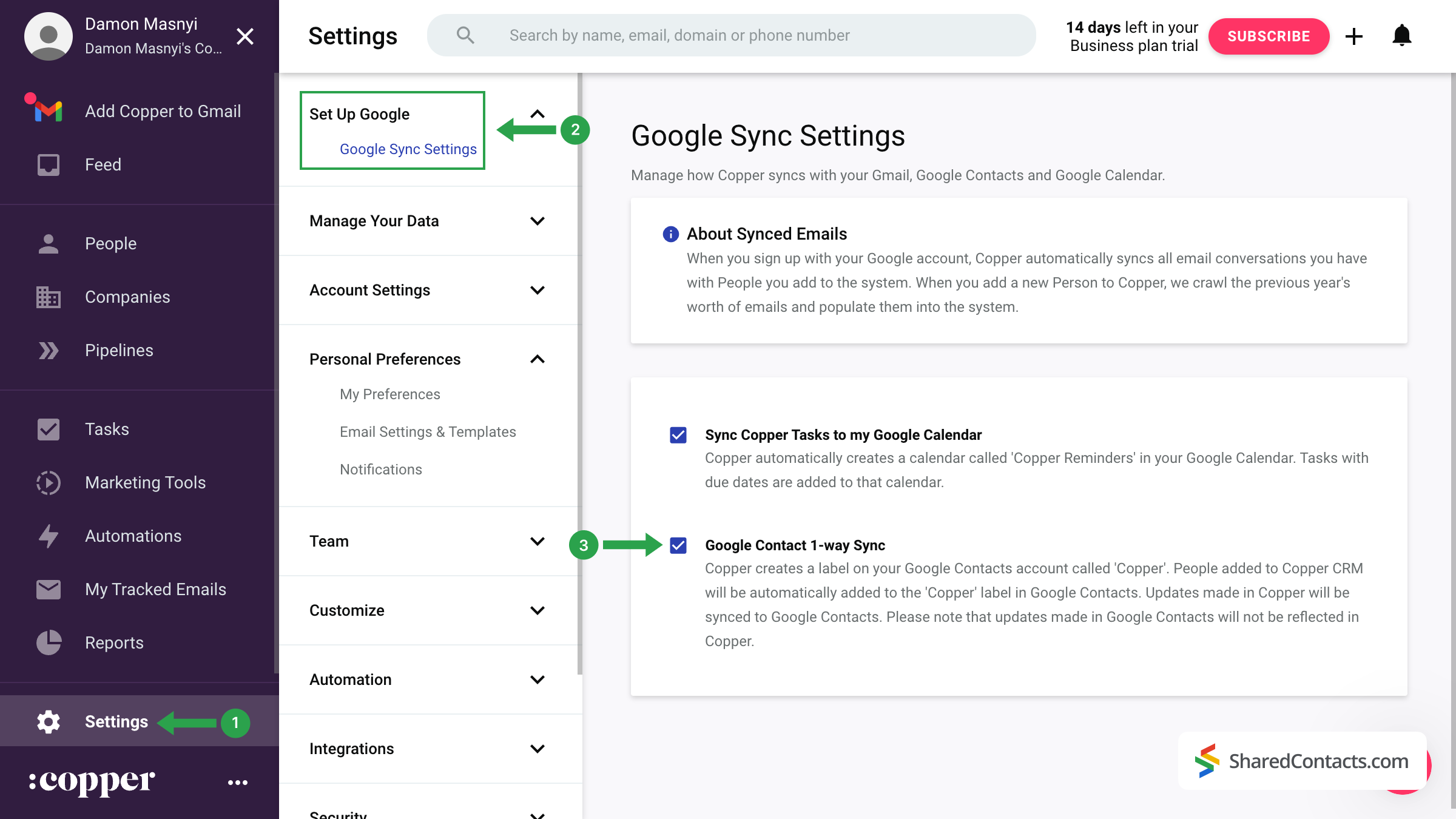
- Napsauta Copper-kojelaudan vasemmassa valikossa kohtaa Asetukset.
- Etsi ja napsauta näytön yläreunasta Googlen määrittäminen ja valitse sitten Google Sync -asetukset.
- Rastita ruutu, jossa on merkintä Google Contact 1-suuntainen synkronointi.
Suorittamalla nämä vaiheet Copper luo oman kansion Google Contacts -palveluun. Kaikki CRM:ään syötetyt uudet tiedot synkronoidaan automaattisesti Google-tilisi kanssa.
Tärkeä huomautus: Ensimmäinen synkronointi ei ole välitön. Jos et heti näe "Copper"-merkintää Google-yhteystiedoissasi, älä huoli. Täydellinen synkronointi voi kestää muutamasta tunnista 24 tuntiin.
Share Copper Contacts With SharedContacts.com
Once your contacts have been successfully transferred from Copper CRM to Google Contacts, you can share them with colleagues and team members using the SharedContacts.com application.
Access your SharedContacts.com account. If you don’t have the app installed, click täällä asentaa sen helposti.
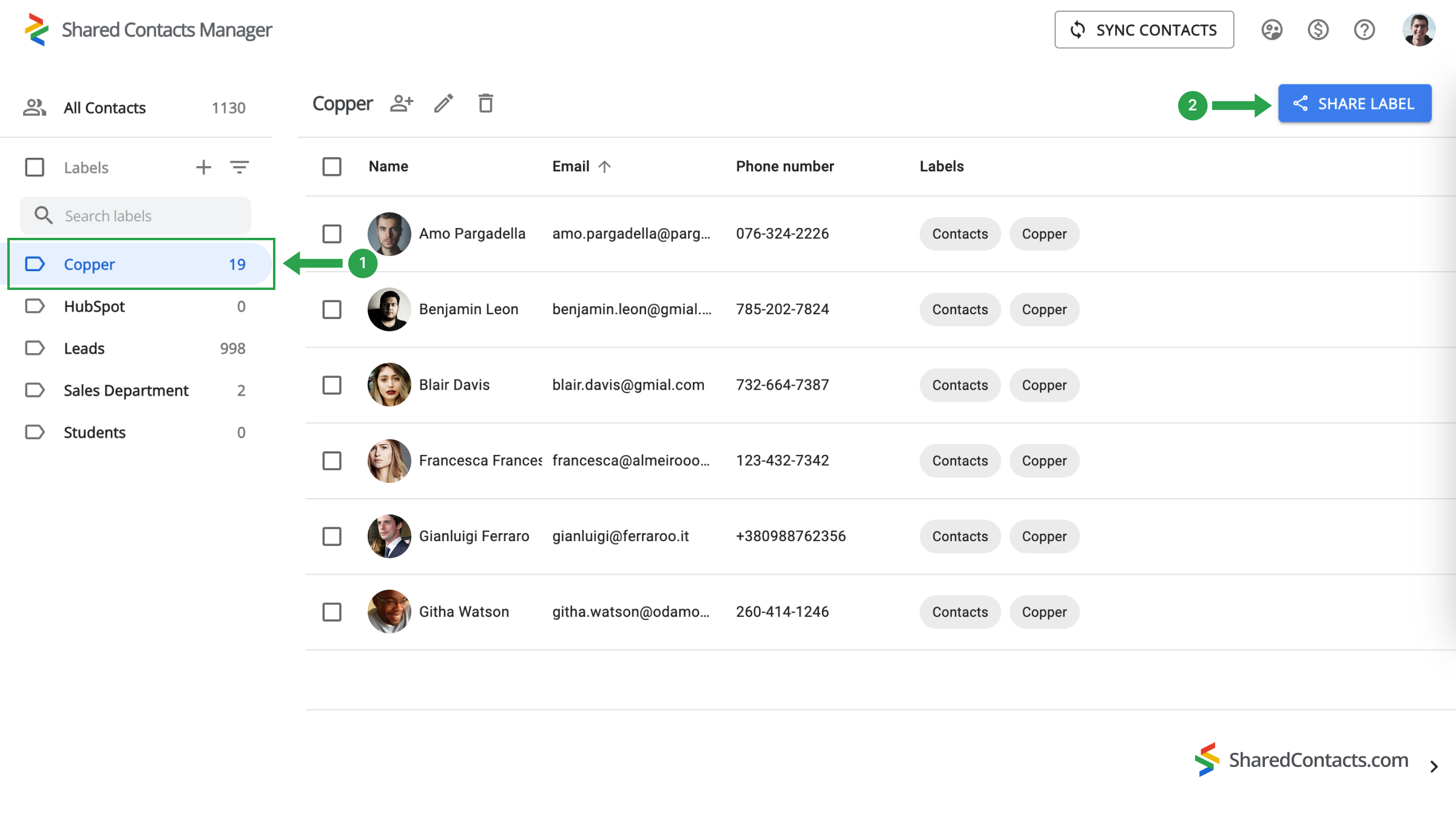
- Etsi vasemmanpuoleisesta valikosta "Copper"-merkintä, johon kaikki synkronoidut yhteystiedot on tallennettu, ja valitse se.
- Napsauta Jaa etiketti nappi.
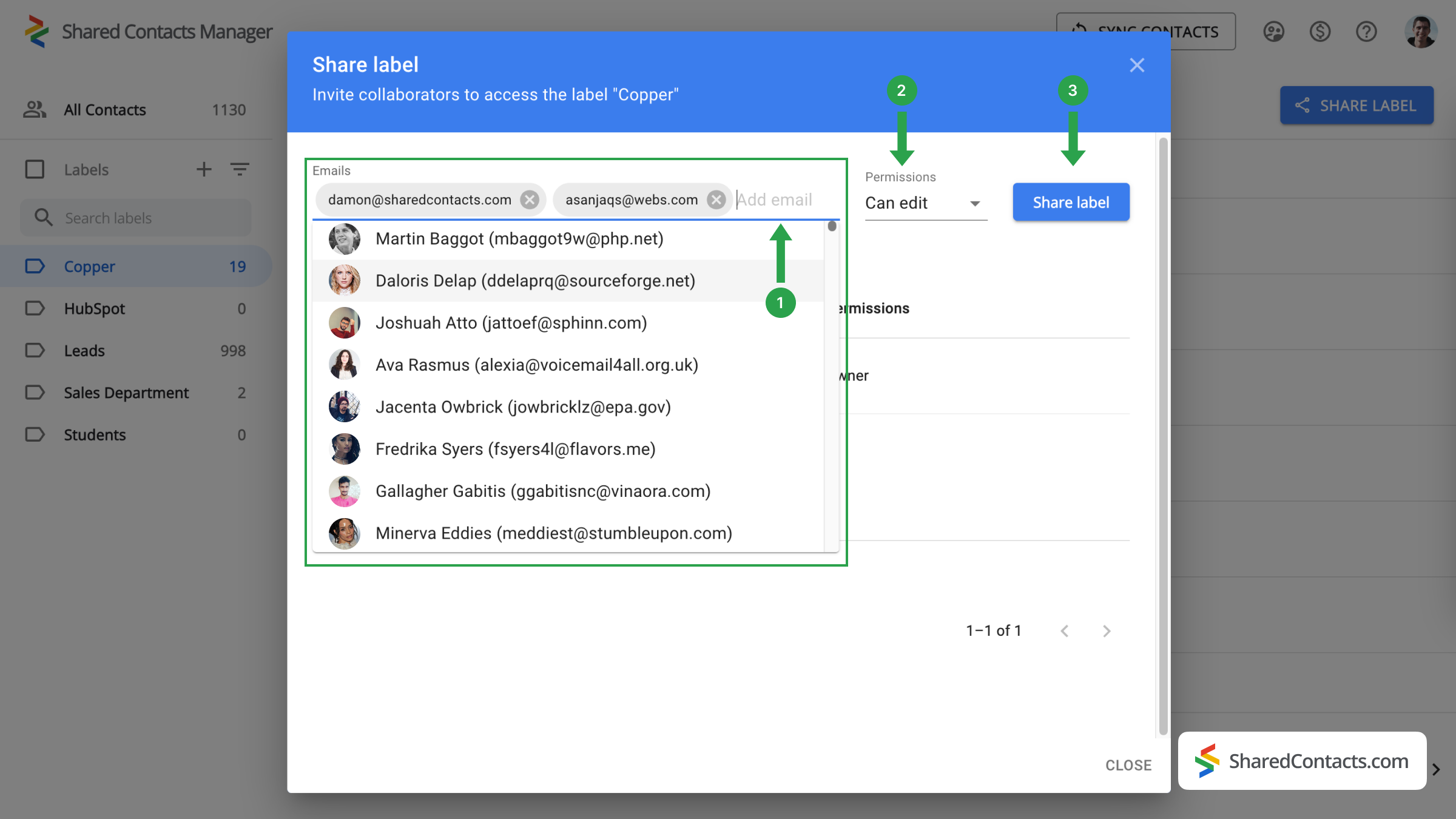
Seuraavassa ikkunassa sinua pyydetään valitsemaan henkilöt, joille haluat antaa käyttöoikeudet, ja määrittämään heidän oikeutensa.
- Vuonna Sähköpostit kenttään voit lisätä yhteistyökumppaneita valitsemalla heidät luettelosta, syöttämällä heidän nimensä tai kirjoittamalla heidän sähköpostiosoitteensa.
- Valitse kullekin tiimin jäsenelle sopiva käyttöoikeustaso käytettävissä olevista vaihtoehdoista.
- Klikkaa Jaa etiketti prosessin loppuun saattamiseksi.
Nyt kuka tahansa, jolle olet antanut pääsyn Copper-yhteystietoihin, voi tarkastella ja käyttää niitä asettamiesi käyttöoikeuksien mukaisesti.
Copper ja Google Contacts -integraation johtopäätökset
In summary, while Copper CRM offers a robust suite of features for managing customer relationships, it may not be flawless for organizations focused primarily on contact management. SharedContacts.com, on the other hand, provides a cost-effective and efficient alternative, allowing businesses to manage contacts without the burden of multiple licenses. Integration with Google Contacts improves collaboration, making it easy for team members to access and share contact information, and the user-friendly interface ensures quick adoption and ease of use.
By choosing SharedContacts.com, businesses can enjoy a clearer, more affordable approach to contact management, ensuring they stay organized and efficient without incurring the high costs associated with traditional CRMs like Copper.
Aiheeseen liittyvät artikkelit
Synkronoi Pipeliner CRM -yhteystietosi Googlen kanssa ja hyödy täydellisestä yhteystietojen integraatiosta lähes ilmaiseksi.
Synkronoi ja jaa Zendeskin yhteystietoja Google Workspacen kautta, säästä CRM-kustannuksia ja tehosta työnkulkua.
Ei kommentteja