Google Workspaceを通じてPipedriveの連絡先をチームで共有し、CRMのコストを最小限に抑える。

重要なポイント
- このツールは、チームメンバー全員が連絡先にアクセスし、編集できるため、チームワークとコミュニケーションの向上を促進します。
- チームの規模に合わせて簡単に拡張できるため、どのような規模の企業にも適しています。
- Google Workspaceとの統合により、コンタクト管理が簡素化され、プラットフォーム間の切り替えの必要性が減少します。
Pipedriveは、顧客関係管理を合理化するための強力な機能を提供する強力なソリューションとして、ビジネスツール市場に精通している私たちは知っています。しかし、多くの中小企業にとって、Pipedriveの高価格や、複雑さ、メンテナンスなどの制限が大きな障壁となっています。
Now, with Google and tools like SharedContacts.com, organizations can reach higher efficiency quicker, easier, and at a much lower cost. Irrespective of company size or financial resources, all team members can harness the power of Pipedrive Contacts without the burden of 高価なライセンス for each co-worker. Choose who gets full or limited access to your Pipedrive contacts, boost productivity, and enjoy the accessibility and collaborative flexibility of Google Workspace and Googleの共有連絡先.
Googleコンタクトでラベルを作成する
まず、Pipedriveと同期し、共有可能な連絡先情報を含む連絡先フォルダまたは「ラベル」を作成する必要があります。
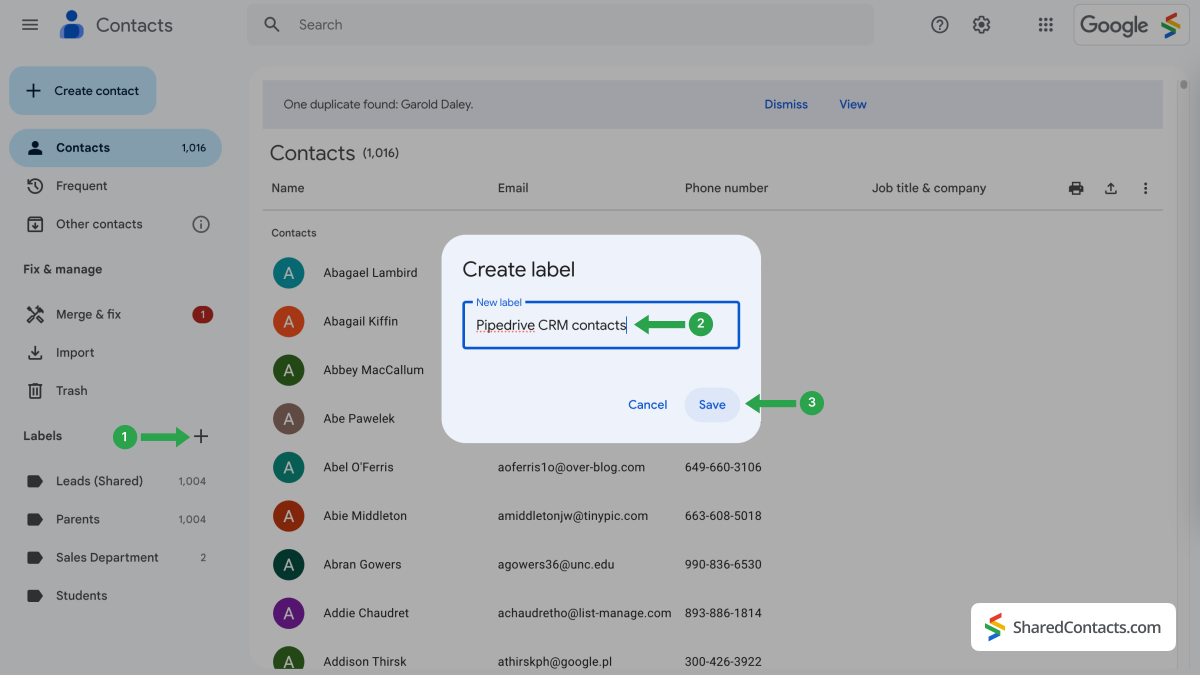
- Googleコンタクトにログインし をクリックする。 アイコンをクリックしてください。
- ラベル作成ウィンドウでラベルの名前を入力.Pipedrive CRM contactsなど、わかりやすい名前を選択します。
- クリック セーブ をクリックしてラベル作成を完了します。
Pipedrive CRMの連絡先をGoogle連絡先と同期する
次に、Pipedriveの連絡先リストをGoogleコンタクトに統合します。
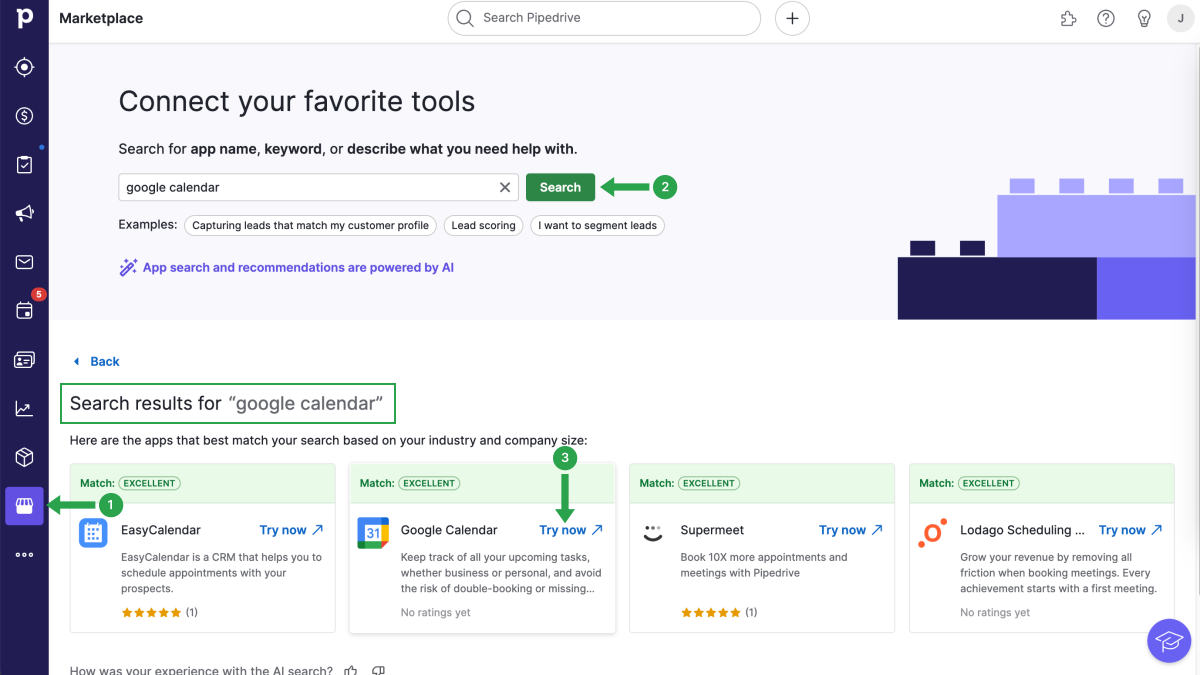
- Pipedriveアカウントにログインして マーケットプレイス アイコンをクリックします。
- 連絡先を同期するには、PipedriveワークスペースにGoogleカレンダーをインストールする必要があります。連絡先を同期するには お気に入りのツールを接続 セクションで、検索フィールドにGoogle Contactsと入力して 検索.
- 検索結果でGoogleカレンダーを見つけ 今すぐ試す ボタンをクリックする。
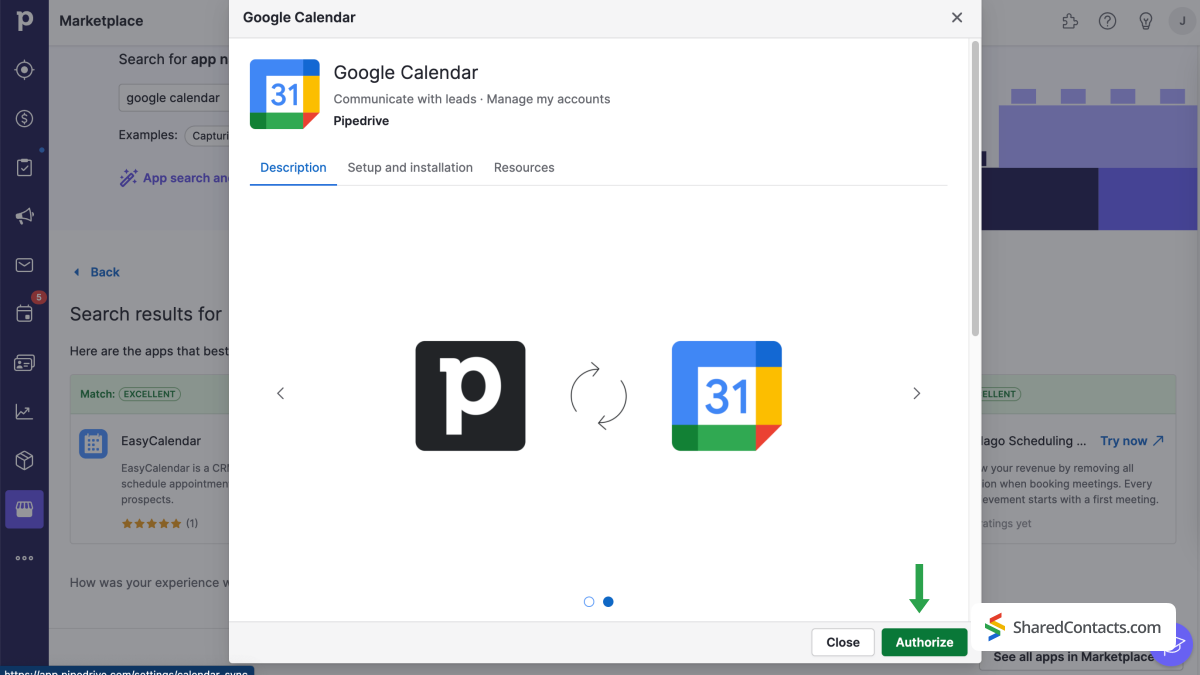
次のウィンドウで、PipedriveはGoogleカレンダーとの同期を承認するよう求めてきます。を選択します。 認可する を進める。
セットアップを完了するには、以下の手順に従ってください:
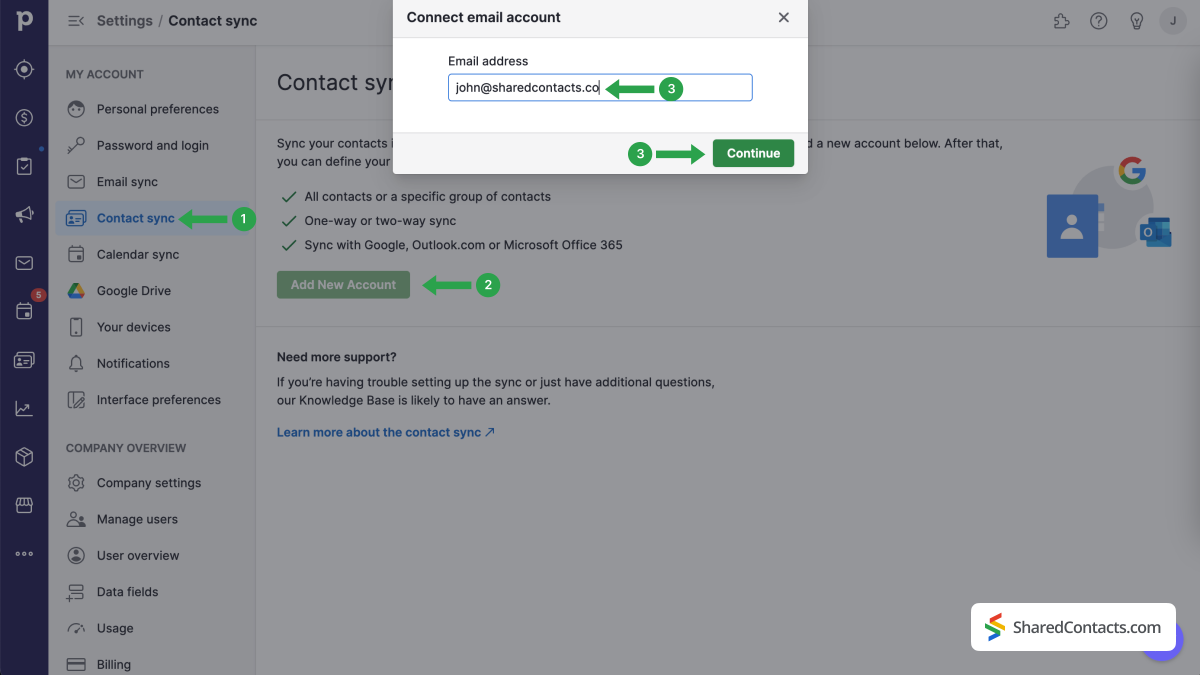
- 選択 連絡先同期 左側のサイドバーにある「マイアカウント」メニューから、「マイアカウント」を選択してください。
- 選ぶ 新しいアカウントを追加する を選択します。それ以外の場合は、以前に統合したアカウントを選択できます。
- 同期したいGoogleアカウントのメールアドレスを入力します。
- を押す。 続ける ボタンをクリックする。
いくつかのステップを経て、Googleアカウントへのアクセス許可が要求されます。
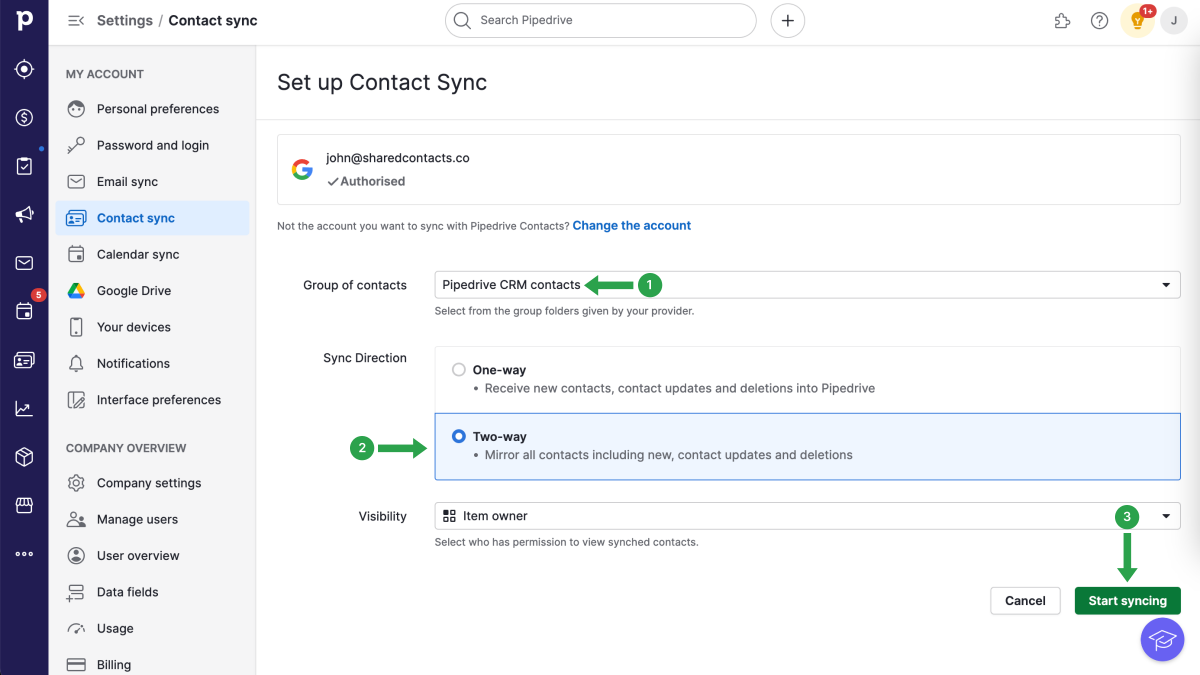
連絡先同期ページで、以下のステップを続けます:
- をクリックする。 コンタクトグループ をクリックし、ドロップダウンメニューからPipedrive CRMの連絡先を選択します。
- シンクの方向 双方向シンク.
- をクリックする。 同期開始.
注意:Googleの連絡先の上限は25000件です。この制限に達すると、Googlerの連絡先とPipedriveの同期が停止されます。
All preparatory stages are complete. You have successfully created a label for the Pipedrive contact list in your Google Contacts and fully integrated your Google account with the CRM. Now, you’re ready to maximize its potential by granting your colleagues access to all your contacts using SharedContacts.com.
Share Pipedrive contacts with the SharedContacts.com App
Log into your SharedContacts.com account. Click これ をインストールしてください。
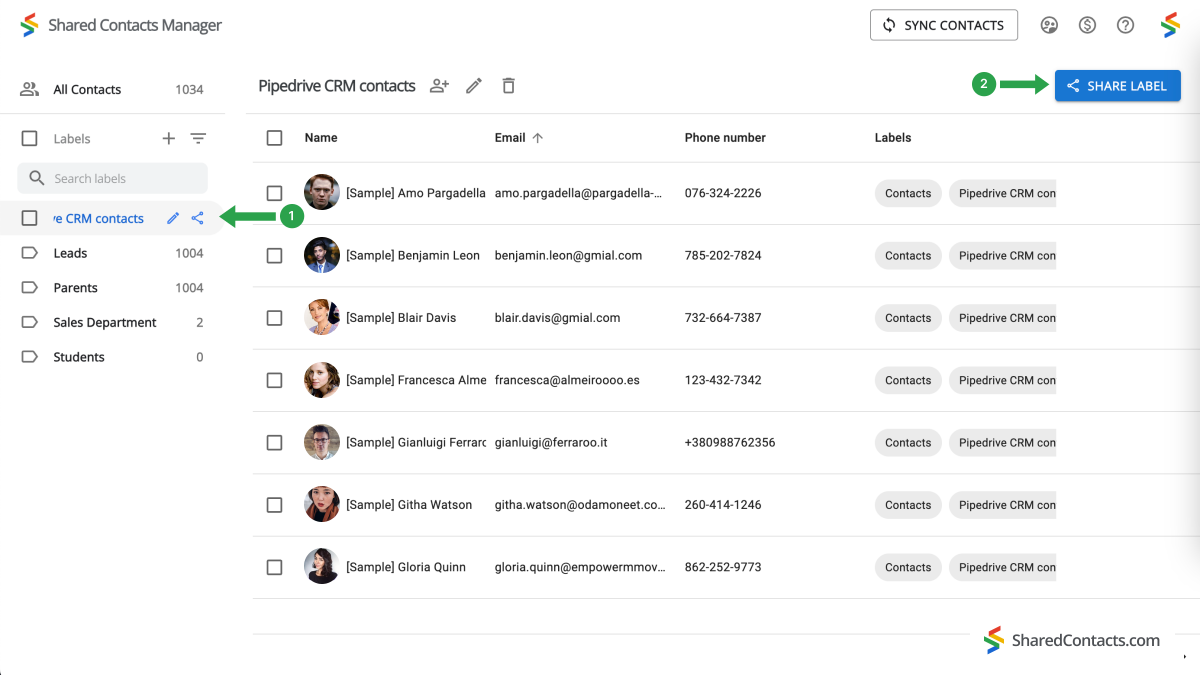
In the left sidebar, you will find the ‘Pipedrive CRM contacts’ label you have created in your Google Contacts and connected with the CRM earlier. Select this label and you’ll see all your contact data from Pipedrive here in the SharedContacts.com’s dashboard, ready to be shared with your team members who need access to these contacts.
- Pipedrive CRMの連絡先ラベルを選択します。
- 共有ラベルをクリックする。
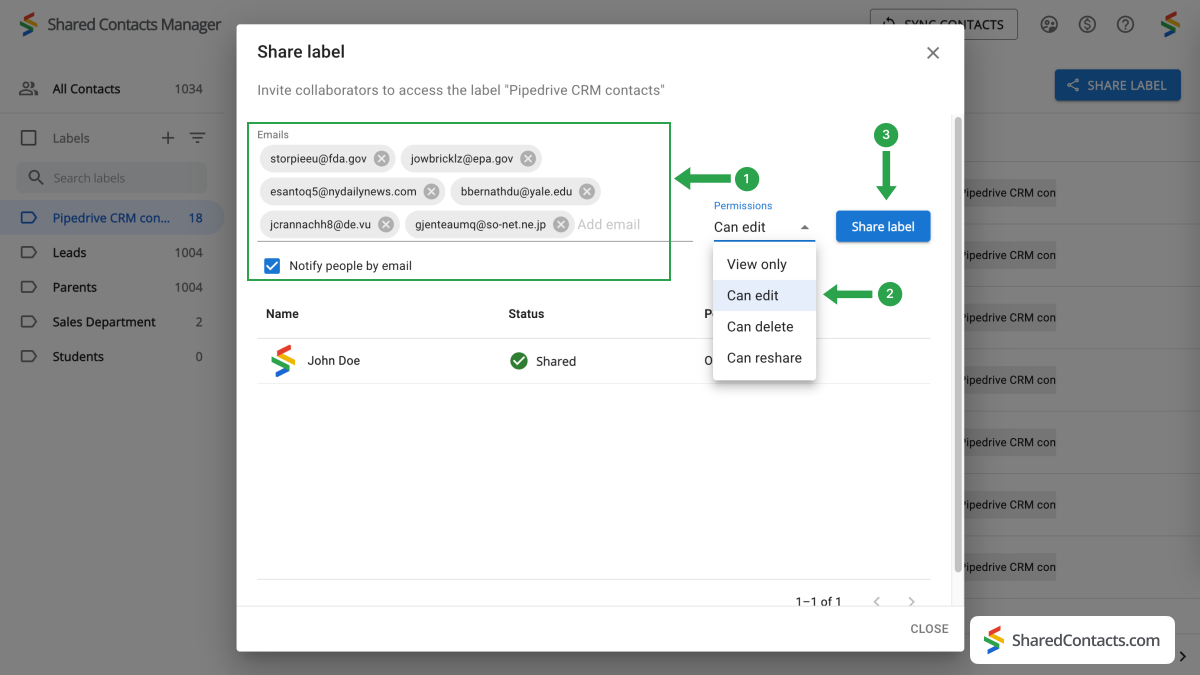
次のウィンドウでは、連絡先へのアクセスを許可するユーザーを選択し、その権限レベルを設定します。
- 協力者を追加します。協力者を選ぶにはいくつかの方法があります:
- Eメール」フィールドをクリックし、ドロップダウンリストをブラウズして個人を見つけ、その名前をクリックします。アクセス権を与えるチームメンバー全員について、この手順を繰り返します;
- を入力するか、検索フィールドに直接メールアドレスを貼り付けます。多くの同僚と連絡先を共有している場合、この方法は実用的ではありません;
- 同僚の名前を入力し、一人ずつクリックしてリストに追加する。
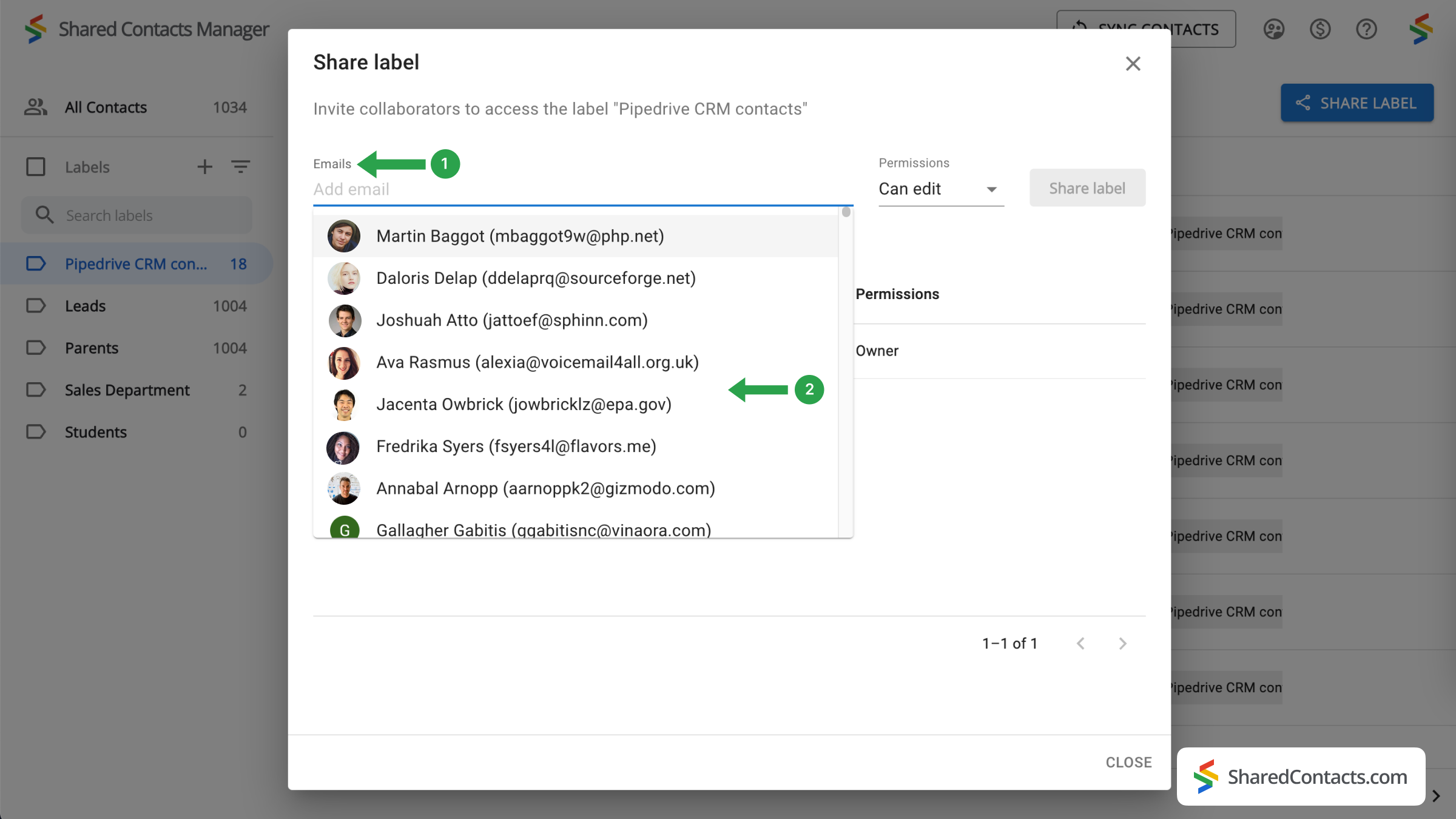
- 権限レベルを設定します。権限メニューから選択できます。同僚に編集権限を与えることをお勧めします。チームメンバー全員の更新が同期され、最新の情報が表示されます。
- ラベルを共有]をクリックすると、この連絡先グループへのアクセスを許可した全員に、ラベル内の連絡先と対話できるようになったことを知らせる通知メールが送信されます。
結論
SharedContacts.com simplifies and financially optimizes the process of managing Pipedrive contacts, making it an excellent solution for businesses of all sizes. Unlike Pipedrive’s costly licensing model where you have to pay for each user, SharedContacts.com allows teams to share and manage contacts easily through Google Workspace for minimal investment. This tool scales with your team, allowing every member, regardless of their role, to access and edit contact information based on the permissions you set. Centralizing contact management is a pathway to enhanced collaboration and simplified workflows, and this is exactly what Shared Contact Manager does, ultimately increasing productivity across your organization.
関連記事

Pipeliner CRMの連絡先をGoogleと同期し、ほぼ無料で完璧な連絡先統合をご利用いただけます。

Zendesk の連絡先を Google Workspace で同期・共有し、CRM コストの削減とワークフローの合理化を実現


コメントなし