Google Workspaceを通じてCopper CRMの連絡先を同期し、CRMのライセンス料を節約する

Copper CRMは、顧客関係を管理するための優れた高機能ソフトウェアです。しかし、多くの企業にとって、特にCopperのようなCRMが提供する豊富な機能を必要としない場合には、最適とは言えないかもしれません。主に顧客とのコンタクト管理のためのソリューションを求めている企業は、しばしば過剰な機能で負担をかけることがあります。 ライセンス費用が高い CRMは、チームメンバーごとに個別のライセンスが必要です。
Yet, there is a more affordable and suitable way for such companies to organize and manage their interactions with clients. SharedContacts.com offers a fantastic alternative to CRMs like Copper. It provides several key benefits, including affordability, as it does not require a separate license for every team member. This makes it accessible for businesses with tight budgets. The tool ensures streamlined collaboration among co-workers, allowing everyone to access, update, and share contact information easily. With Copper and Google Contacts integration, users can manage contacts directly on their mobile devices, enhancing usability and mobility. The interface is user-friendly and familiar, reducing the learning curve and enabling quick adoption by new users. By turning your CRM data into グーグル共有連絡先このアプリを使えば、Googleのエコシステム内でチーム全員が簡単にコラボレーションできる。
SharedContacts.com is a cost-effective, collaborative, and convenient alternative for businesses focused on efficient contact management without the high costs and complexity of CRMs like Copper, and it takes mere minutes to install it and enjoy its functionality.
銅とグーグルの統合
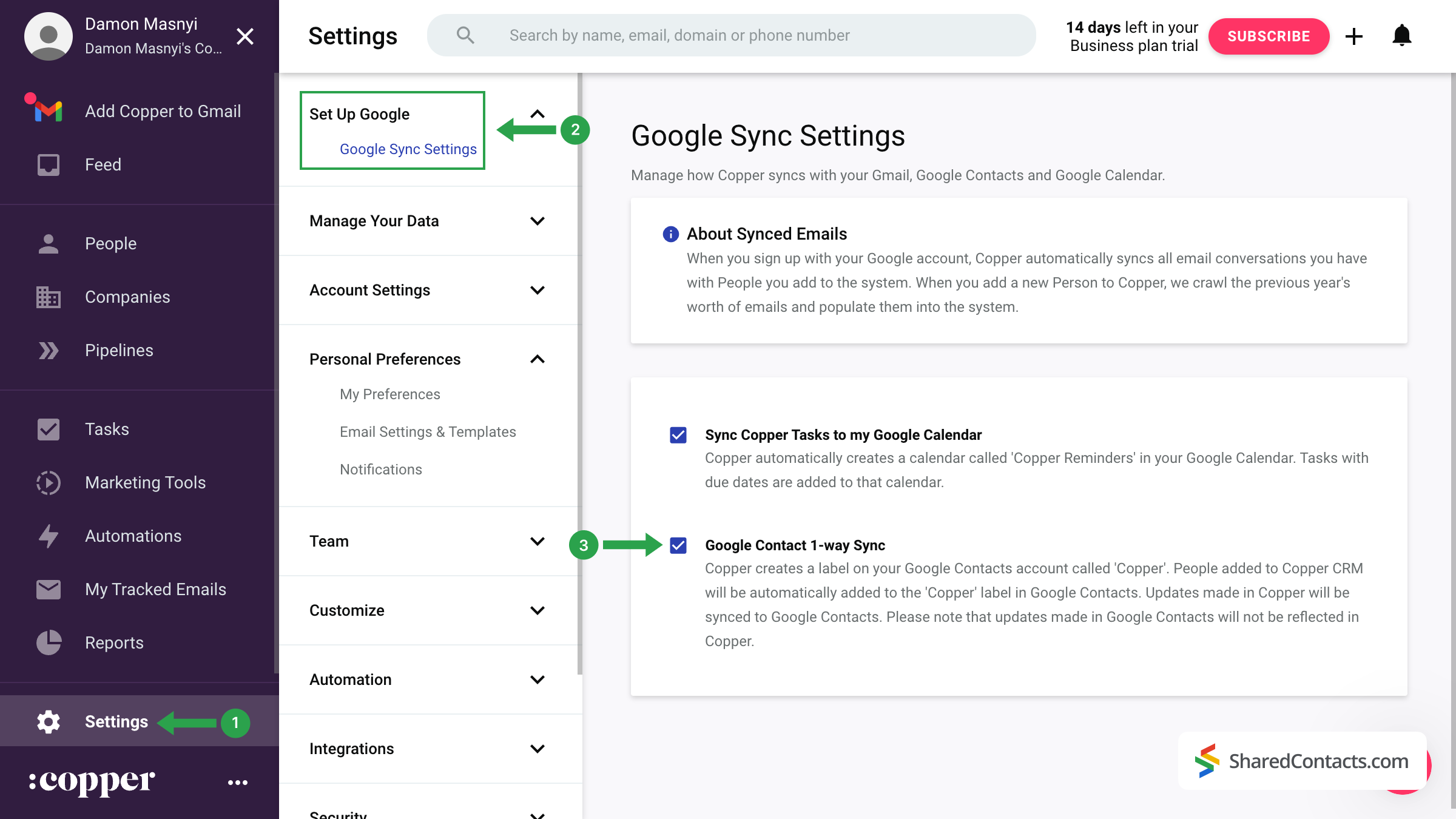
CopperとGoogleの統合は簡単で、いくつかのステップを踏むだけです。設定するには、CRMアカウントにログインし、以下の手順に従ってください:
- カッパー・ダッシュボードの左メニューから 設定.
- 画面上部にある「Set up Google」を見つけてクリックし、次の項目を選択します。 グーグル同期設定.
- というラベルのついたボックスにチェックを入れる。 グーグルコンタクト1ウェイ同期.
これらのステップを完了することで、カッパーはGoogleコンタクトに専用フォルダを作成します。CRMに入力された新しいデータは、自動的にGoogleアカウントと同期されます。
重要な注意事項 初期同期はすぐに完了するわけではありません。Googleコンタクトに "Copper "ラベルがすぐに表示されなくても、心配しないでください。完全な同期には数時間から24時間かかります。
Share Copper Contacts With SharedContacts.com
Once your contacts have been successfully transferred from Copper CRM to Google Contacts, you can share them with colleagues and team members using the SharedContacts.com application.
Access your SharedContacts.com account. If you don’t have the app installed, click これ で簡単にインストールできる。
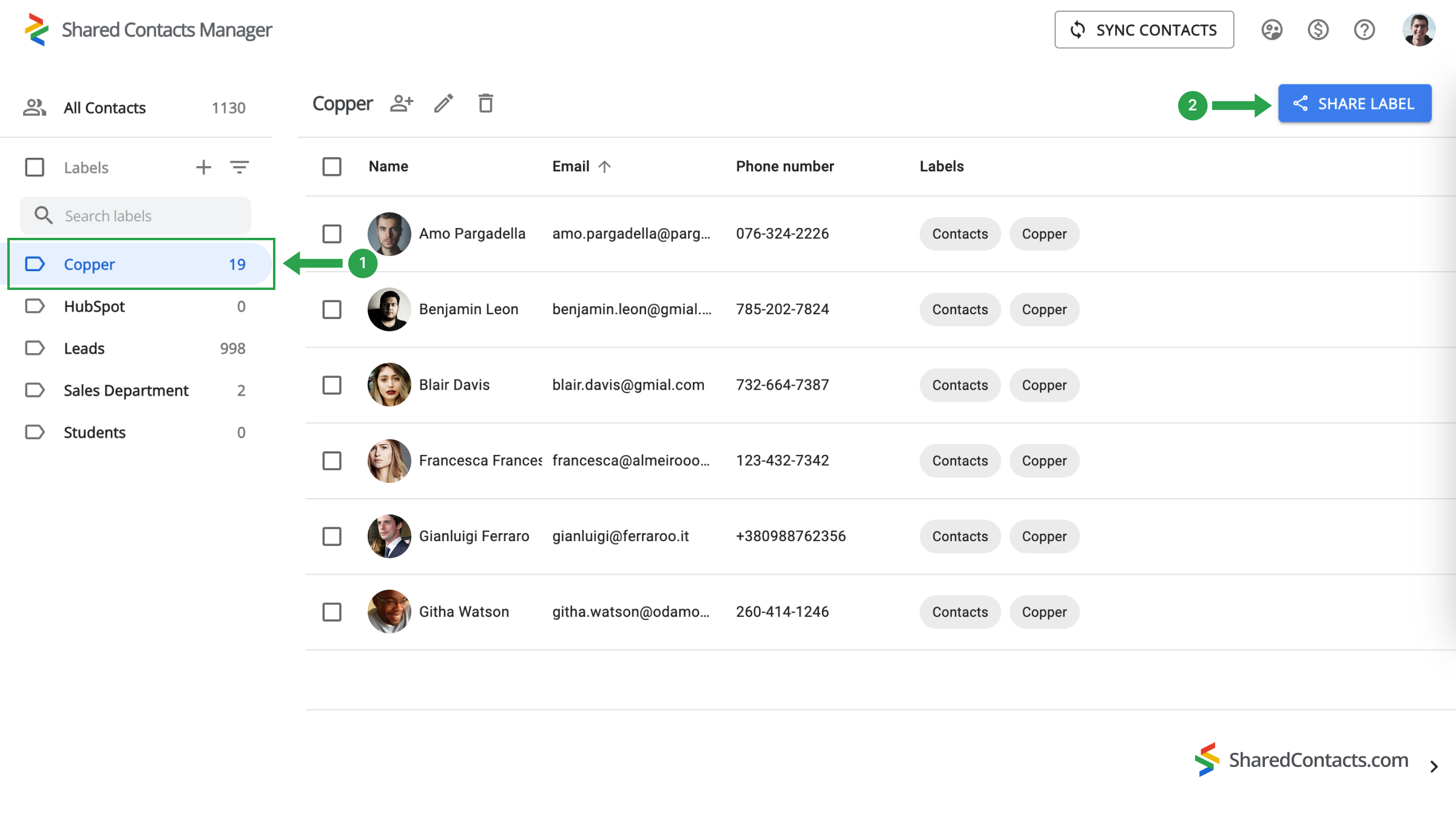
- 左のメニューで、同期された連絡先が保存されている "Copper "ラベルを見つけ、選択します。
- をクリックしてください。 シェアラベル ボタンをクリックする。
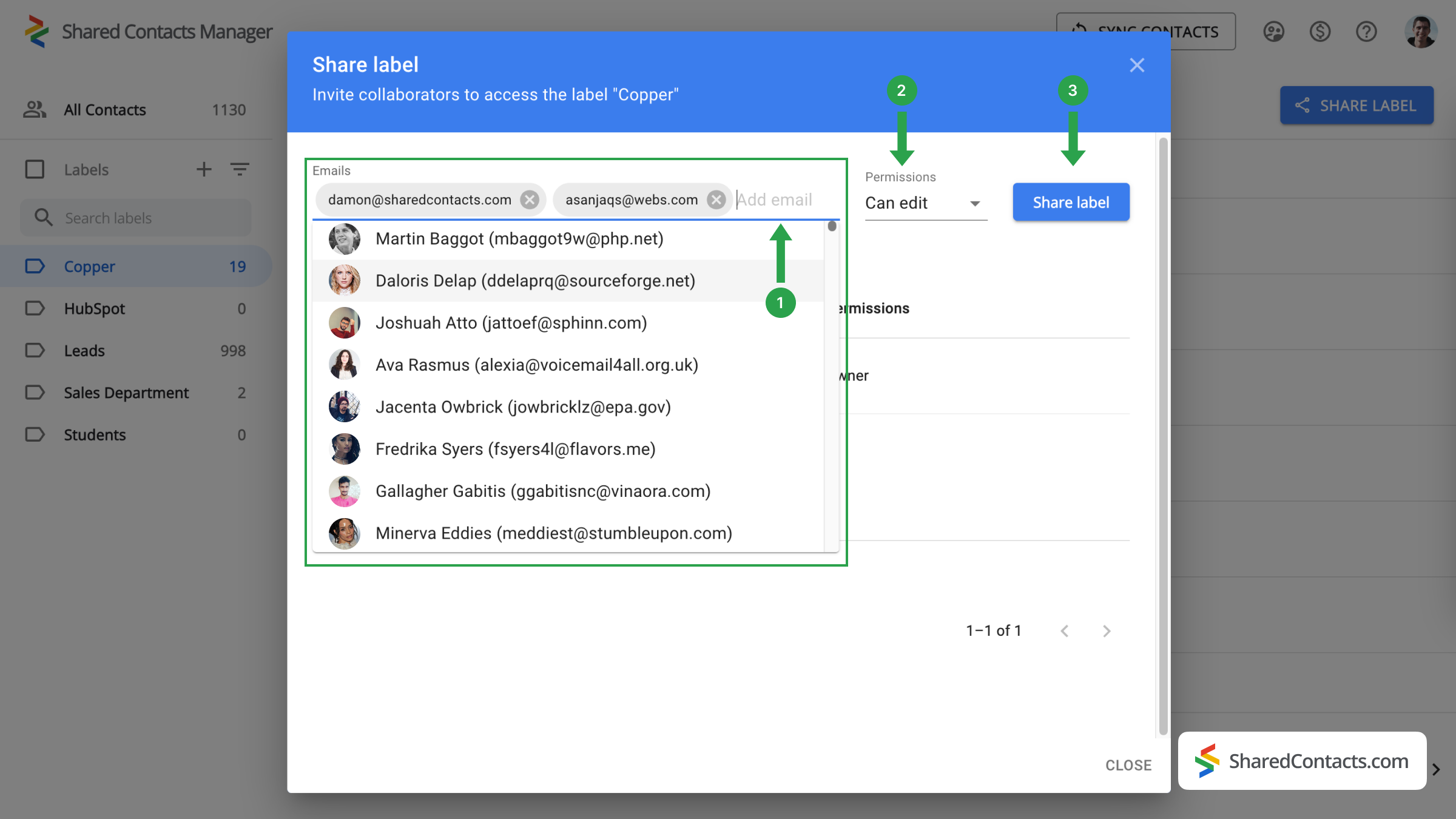
次のウィンドウでは、アクセス権を与えたい人を選択し、その権限を指定するプロンプトが表示されます。
- の中で 電子メール フィールドで、リストから選択するか、名前を入力するか、メールアドレスを入力して共同作業者を追加します。
- 利用可能なオプションから、各チームメンバーの適切な権限レベルを選択します。
- クリック シェアラベル で完了する。
これで、カッパーの連絡先へのアクセスを許可した人は誰でも、設定した権限に従って閲覧・利用できるようになります。
CopperとGoogle Contactsの統合に関する結論
In summary, while Copper CRM offers a robust suite of features for managing customer relationships, it may not be flawless for organizations focused primarily on contact management. SharedContacts.com, on the other hand, provides a cost-effective and efficient alternative, allowing businesses to manage contacts without the burden of multiple licenses. Integration with Google Contacts improves collaboration, making it easy for team members to access and share contact information, and the user-friendly interface ensures quick adoption and ease of use.
By choosing SharedContacts.com, businesses can enjoy a clearer, more affordable approach to contact management, ensuring they stay organized and efficient without incurring the high costs associated with traditional CRMs like Copper.
関連記事
Pipeliner CRMの連絡先をGoogleと同期し、ほぼ無料で完璧な連絡先統合をご利用いただけます。
Zendesk の連絡先を Google Workspace で同期・共有し、CRM コストの削減とワークフローの合理化を実現
コメントなし